
How Security Managed Service Providers Reduce Alert Noise
Learn how security managed service providers reduce alert noise with dependency mapping, correlation, routing, and smarter monitoring workflows.
Security managed service providers (MSSPs) live or die by response quality. But response quality drops when every monitor, endpoint sensor, ticketing rule, and chat integration shouts with equal urgency. Alert noise is not just annoying. It hides real incidents, burns out analysts, delays escalation, and makes clients question the value of outsourced security operations.
Reducing alert noise does not mean ignoring more alerts. It means designing a monitoring workflow where the right signal reaches the right person, with enough context to act quickly. For MSSPs that manage many clients, environments, and service tiers, that requires a mix of dependency awareness, correlation, severity standards, routing discipline, and continuous tuning.
The goal is simple: fewer interruptions, faster investigations, and more confidence that a page at 2:00 a.m. is worth waking up for.
Why alert noise is harder for MSSPs
Internal IT teams usually manage one environment. MSSPs manage many, each with different uptime expectations, maintenance practices, network layouts, business-critical applications, and escalation paths. A noisy alerting model that is merely inconvenient for one company can become unmanageable across dozens of tenants.
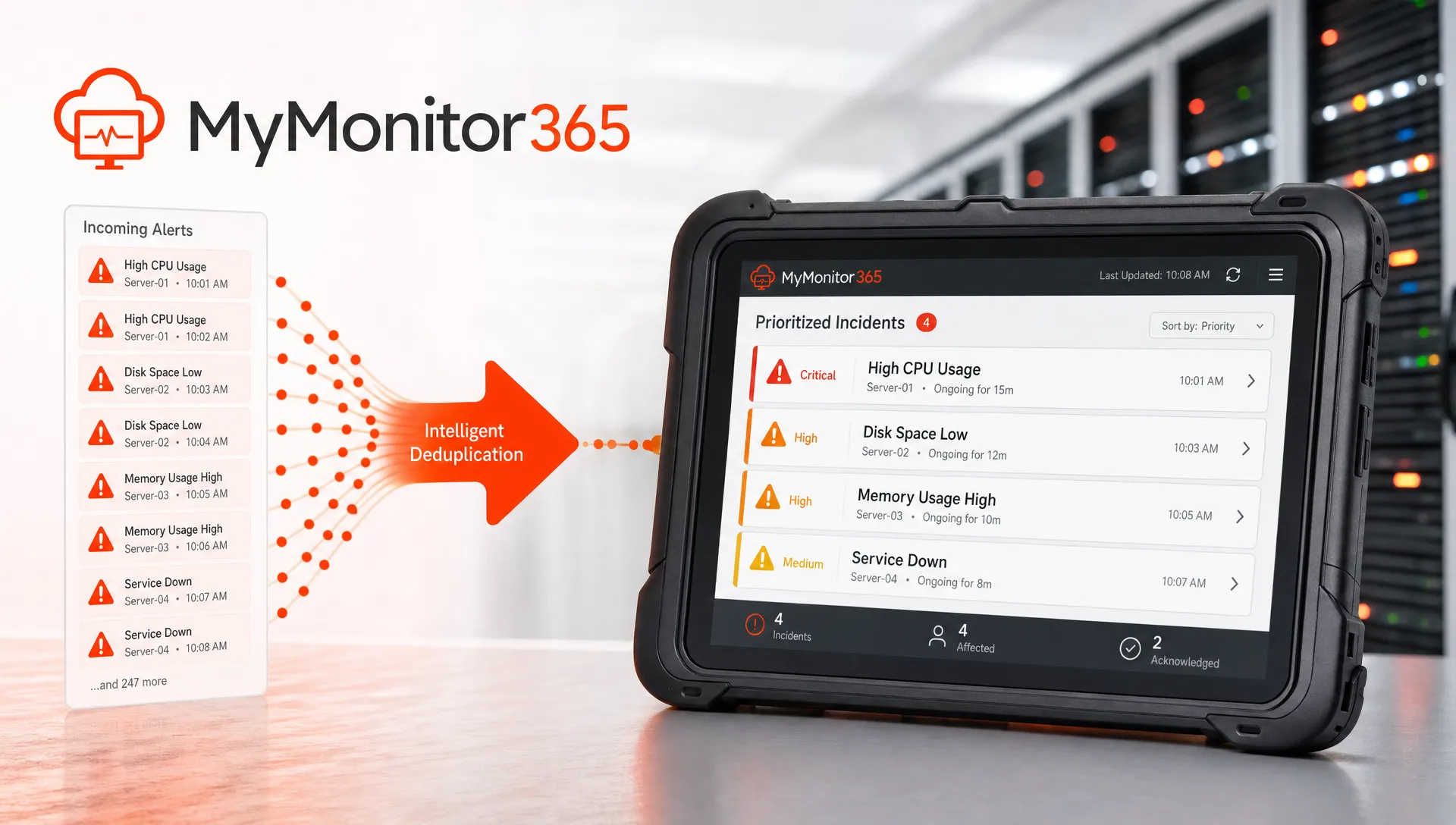
The challenge is not only volume. It is ambiguity. A failed HTTPS check might indicate an application outage, a DNS issue, an expired certificate, a cloud routing problem, or a client-side maintenance window that nobody recorded. If every symptom creates its own ticket, analysts waste time proving that ten alerts are actually one incident.
This is why alert reduction must be treated as an operational design problem, not a tuning exercise done once during onboarding. The NIST Cybersecurity Framework 2.0 emphasizes Detect, Respond, and Recover as core functions. For an MSSP, those functions depend on clean signal flow. If detection creates chaos, response becomes slower and recovery becomes harder.
The common sources of alert noise
Most noisy monitoring environments suffer from the same patterns. They may look technical on the surface, but the root cause is often missing context.
| Noise source | What happens | Better approach |
|---|---|---|
| Duplicate checks | Multiple tools report the same outage | Deduplicate by service, dependency, and client |
| Dependency storms | A router failure triggers alerts for every downstream service | Model parent-child relationships and suppress symptoms |
| Weak severity rules | Low-risk warnings page the same team as critical incidents | Define severity by business impact and urgency |
| No maintenance control | Planned work creates incident tickets | Use maintenance windows and change calendars |
| Missing enrichment | Analysts receive an alert with no client, owner, or runbook | Add tenant, service tier, recent change, and escalation context |
| Bad routing | Every alert goes to one queue or channel | Route by client, service type, severity, and on-call ownership |
The biggest lesson is that noise rarely comes from one bad threshold. It comes from alerts that are disconnected from service reality.
Start with a service model, not a pile of monitors
A common mistake is to onboard monitoring one asset at a time: one website, one firewall, one DNS record, one SSL certificate, one API endpoint. This creates visibility, but not necessarily understanding. When something fails, the MSSP sees many red lights without knowing which one matters most.
A service model groups technical checks around the client-facing service they support. For example, an ecommerce platform might include DNS resolution, HTTPS availability, SSL validity, API health, payment gateway reachability, and key TCP ports. A client VPN service might include ICMP reachability, firewall availability, authentication service ports, and regional network checks.
Once services are modeled, alerts can be interpreted through business impact. A failed noncritical lab server check should not compete with a production checkout outage. A certificate warning 20 days before expiry should not create the same response as a live payment API failure.
MSSPs should document three things for each monitored service: who owns it, how critical it is, and what must happen when it fails. That documentation becomes the foundation for routing, escalation, and client reporting.
Use dependency awareness to stop alert storms
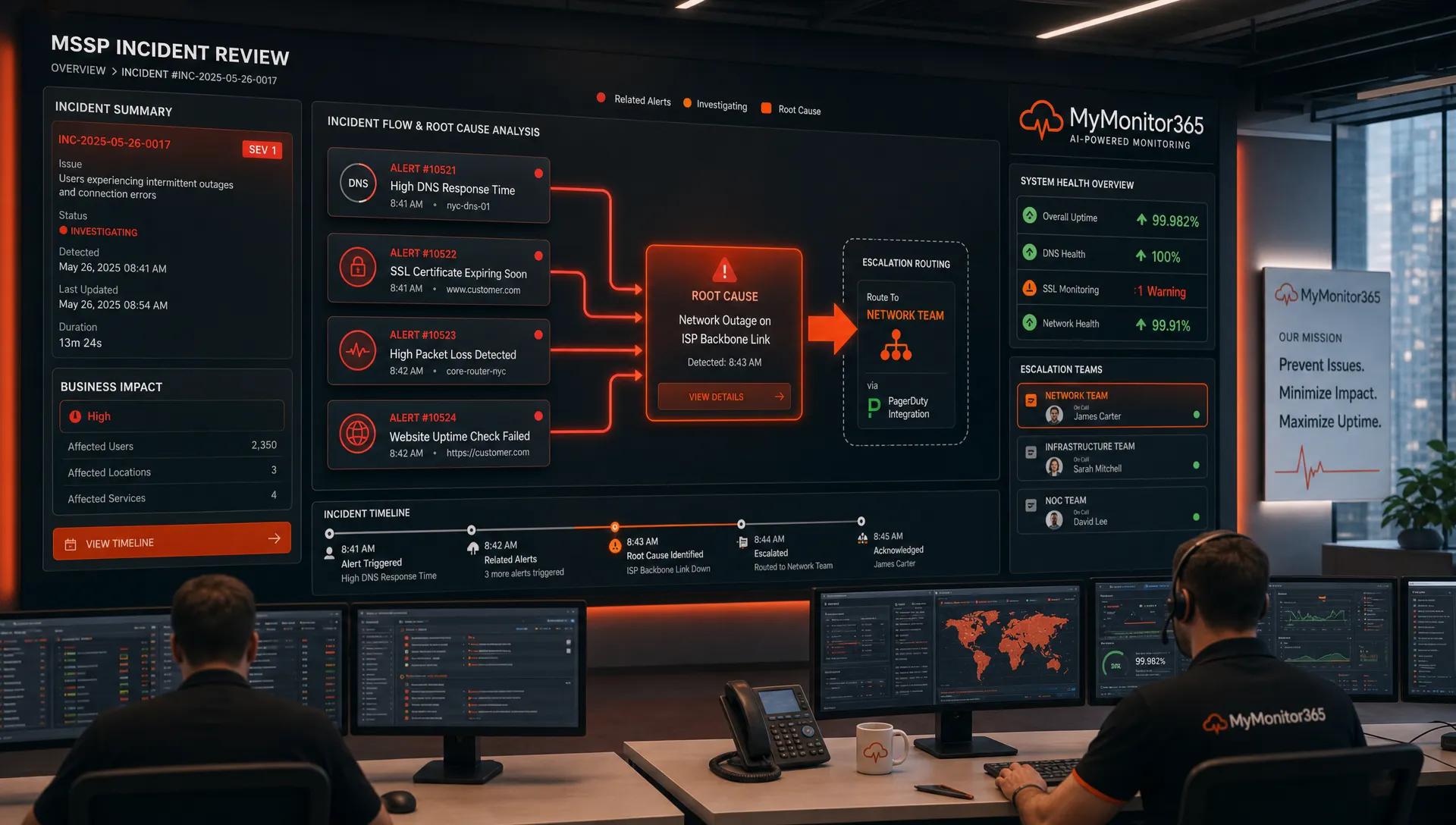
Dependency mapping is one of the fastest ways to reduce alert noise. If an upstream router, firewall, ISP link, or DNS provider fails, every dependent service may appear down. Without dependency logic, the monitoring system can flood analysts with separate alerts for each affected child service.
A better model identifies parent monitors and child monitors. When the parent is down, child checks can still record incidents for reporting and diagnostics, but notifications can be suppressed or grouped. This preserves visibility without overwhelming the team.
MyMonitor365 supports this kind of smarter suppression through monitor dependencies, which is especially useful for MSP and MSSP environments where one upstream outage can affect many downstream services.
Dependency-aware alerting also improves client communication. Instead of saying, “We received 37 alerts,” the MSSP can say, “The primary edge device failed, which affected these dependent services.” That is a much more useful incident narrative.
Correlate uptime, network, DNS, SSL, and security signals
Security and availability are often treated as separate disciplines, but clients experience them together. A DNS hijack, expired certificate, misconfigured firewall rule, or suspicious configuration change can look like downtime. Similarly, a security control failure can expose a service that still appears reachable.
MSSPs reduce noise by correlating signals across layers rather than treating every monitor as an isolated event. HTTP/API monitoring may confirm whether an application is responding. Ping and ICMP checks can show whether the host or network path is reachable. TCP port monitoring can confirm whether a specific service is listening. SSL checks can identify certificate problems before users see browser warnings. DNS monitoring can catch record changes or resolution failures that break access.
This is why a combined approach to network and security monitoring is so important. It gives analysts enough context to distinguish a true security event from a routine outage, and enough operational detail to fix issues faster.
Normalize severity across clients
Without a shared severity model, alert quality depends on individual analyst judgment. One client’s “critical” may be another client’s “medium.” One engineer may escalate immediately, while another waits for confirmation. Over time, inconsistency creates both noise and risk.
MSSPs should define severity levels that combine technical state with business impact. This model should be simple enough for analysts to apply under pressure.
| Severity | Typical condition | Expected handling |
|---|---|---|
| Critical | Production service unavailable, active security exposure, widespread client impact | Immediate page and escalation |
| High | Degraded production service, certificate close to expiry, repeated regional failures | Fast triage and client-aware routing |
| Medium | Single-location failure, noncritical service down, early warning threshold crossed | Ticket or business-hours review |
| Low | Informational change, transient warning, low-risk policy drift | Log, report, or batch for review |
The key is to avoid treating monitor state as severity by default. “Down” is a technical state. “Critical” is a business decision. A test endpoint can be down without requiring a page. A DNS change on a production domain may deserve urgent review even if the website still loads.
Tune thresholds with baselines and multi-location checks
Thresholds are useful only when they reflect normal behavior. A latency threshold that works for one client may be too sensitive for another. A single failed check from one region may indicate a local routing issue, not a global outage.
Multi-location monitoring helps MSSPs separate isolated failures from broad service impact. If an endpoint fails from one location but succeeds from several others, the alert can be treated differently than a failure observed globally. This reduces false positives while preserving early warning value.
Threshold tuning should also consider time. A single failed check may not justify escalation, but repeated failures over several minutes might. SSL expiration warnings should start early enough for renewal, but not so early that they become ignored background noise. DNS change alerts should distinguish expected updates from unauthorized or unexplained changes.
A practical tuning workflow asks these questions:
- Does this alert represent user impact, security risk, or only a technical anomaly?
- Does it need to wake someone up, create a ticket, or appear in a report?
- Does the alert include enough evidence to act without manual lookup?
- Has this alert fired before without requiring action?
- Can dependency suppression, maintenance windows, or grouping reduce repetition?
This is where alert reduction becomes continuous improvement. Every false positive is feedback. Every missed incident is feedback. The monitoring policy should evolve as the client environment changes.
Enrich alerts before they reach a human
A noisy alert is not always one that fires too often. Sometimes it is noisy because it is vague. “Service down” forces an analyst to open multiple systems before making a decision. “Client A production API failing from three regions, SSL valid, DNS unchanged, last successful check two minutes ago” is much more actionable.
Good alert enrichment includes the client name, monitor type, affected service, severity, location, duration, dependency status, recent maintenance status, and escalation path. For security-related alerts, enrichment may also include whether a DNS record changed, whether SSL state changed, or whether the endpoint content no longer matches the expected keyword check.
MSSPs should also keep operational alerts separate from business automation noise. Ticketing updates, sales notifications, marketing automations, and social listening tools such as Redditor AI can be useful in the right workflow, but they should not share the same urgent incident channel unless they represent a real operational risk.
The principle is simple: the incident channel should be sacred. If everything enters it, nothing feels urgent.
Route alerts to the smallest responsible audience
Alert routing is one of the most overlooked noise controls. Many teams try to solve noise by tuning thresholds, but they still send too many notifications to too many people. Broad routing creates passive bystanders, duplicate work, and alert fatigue.
A better routing model uses ownership and severity. Critical production incidents may page the on-call engineer and create an escalation ticket. Medium-priority warnings may create a service desk ticket for business-hours review. Low-priority informational changes may go to a weekly report or audit trail.
Routing should also reflect client contracts. Some clients may pay for 24/7 response on specific services. Others may have business-hours support. The monitoring system should align with those expectations so analysts are not forced to remember every exception manually.
For MSSPs, clean routing also improves accountability. If an alert goes to the right team with the right context, response starts faster. If it goes to everyone, ownership becomes unclear.
Use maintenance windows and audit trails to separate change from incident
Planned work is a major source of avoidable alert noise. Certificate renewals, DNS migrations, firewall policy updates, application deployments, and network maintenance can all trigger monitors. If these activities are not captured in monitoring policy, the MSSP creates unnecessary incidents and may desensitize analysts to real failures.
Maintenance windows help suppress expected alerts during approved work. Audit logs help teams understand what changed and when. Together, they make it easier to determine whether an alert is linked to planned activity, accidental misconfiguration, or possible compromise.
This matters for trust. Clients do not want to be alerted about an outage they already approved. They also do not want a real incident dismissed as “probably maintenance.” A disciplined change-aware monitoring process reduces both problems.
Measure alert quality, not just alert volume
Reducing alert noise is not the same as reducing alert count. An MSSP can make dashboards look quieter by suppressing too much, but that creates hidden risk. The right metrics focus on quality and actionability.
| Metric | What it reveals | Why it matters |
|---|---|---|
| Alert-to-incident ratio | How many alerts become real incidents | Shows whether detection is too noisy |
| Mean time to acknowledge | How quickly humans respond | Indicates whether alerts are trusted and routed well |
| Duplicate alert rate | How often one event creates repeated notifications | Highlights missing deduplication or dependency logic |
| Escalations per client | Which clients generate the most urgent work | Helps identify unstable environments or bad thresholds |
| After-hours pages | How often staff are interrupted outside normal hours | Measures fatigue risk and escalation quality |
| Alerts with runbooks | How many alerts include response guidance | Improves consistency and speed |
These metrics should be reviewed regularly, especially after major incidents. If an alert was ignored, find out why. If it created too many tickets, improve grouping. If it lacked context, enrich it. If it woke up the wrong person, fix routing.
A practical alert noise reduction checklist
MSSPs do not need to solve everything at once. Start with the changes that remove the most unnecessary human interruption while preserving detection coverage.
- Map monitors to business services and client owners.
- Define severity based on impact, not just monitor state.
- Add dependency relationships for upstream devices and shared services.
- Use multi-location checks to distinguish local failures from global incidents.
- Apply maintenance windows for planned work.
- Enrich alerts with tenant, service tier, location, runbook, and escalation context.
- Separate urgent incident channels from informational or business automation channels.
- Review false positives and missed incidents after every major event.
The best MSSP alerting programs are not silent. They are selective. They make noise only when action is needed.
Frequently Asked Questions
How do security managed service providers reduce alert noise? They reduce alert noise by grouping related alerts, modeling dependencies, tuning thresholds, using maintenance windows, enriching notifications, and routing alerts based on severity, ownership, and client impact.
What is the difference between alert suppression and alert reduction? Alert suppression hides or delays notifications under defined conditions, such as a parent monitor outage or maintenance window. Alert reduction is broader. It includes better monitor design, correlation, deduplication, severity rules, and process improvements.
Can reducing alert noise increase security risk? It can if alerts are suppressed without clear logic. A safer approach is to keep recording incidents while reducing duplicate or low-value notifications. MSSPs should measure missed incidents and review suppression rules regularly.
Why are dependency maps important for MSSPs? Dependency maps prevent one upstream failure from creating a storm of downstream alerts. They help analysts identify root cause faster and communicate incidents more clearly to clients.
Which monitoring signals help reduce false positives? Multi-location HTTP/API checks, ping and ICMP checks, TCP port monitoring, SSL checks, DNS monitoring, and keyword content checks all provide context. When correlated, they help analysts understand whether an issue is isolated, widespread, security-related, or caused by a dependency.
Build a quieter monitoring workflow with MyMonitor365
MyMonitor365 helps IT teams, MSPs, and MSSPs monitor websites, servers, DNS, SSL, APIs, and network services with instant alerts, multi-location checks, maintenance windows, audit logs, and alert integrations. If your team is tired of duplicate notifications and unclear incidents, start building a monitoring workflow that prioritizes action over noise.
Free plan available, no credit card required.
Hashtags
#SecurityManagedServiceProviders #MSSP #AlertNoise #UptimeMonitoring #NetworkMonitoring #SecurityMonitoring #IncidentResponse #ITOperations #MSPTools #MyMonitor365