
DNS Switching Without Downtime: A Practical Guide
Plan DNS switching without downtime with TTL prep, validation checks, monitoring, rollback steps, and a practical cutover runbook for IT teams.
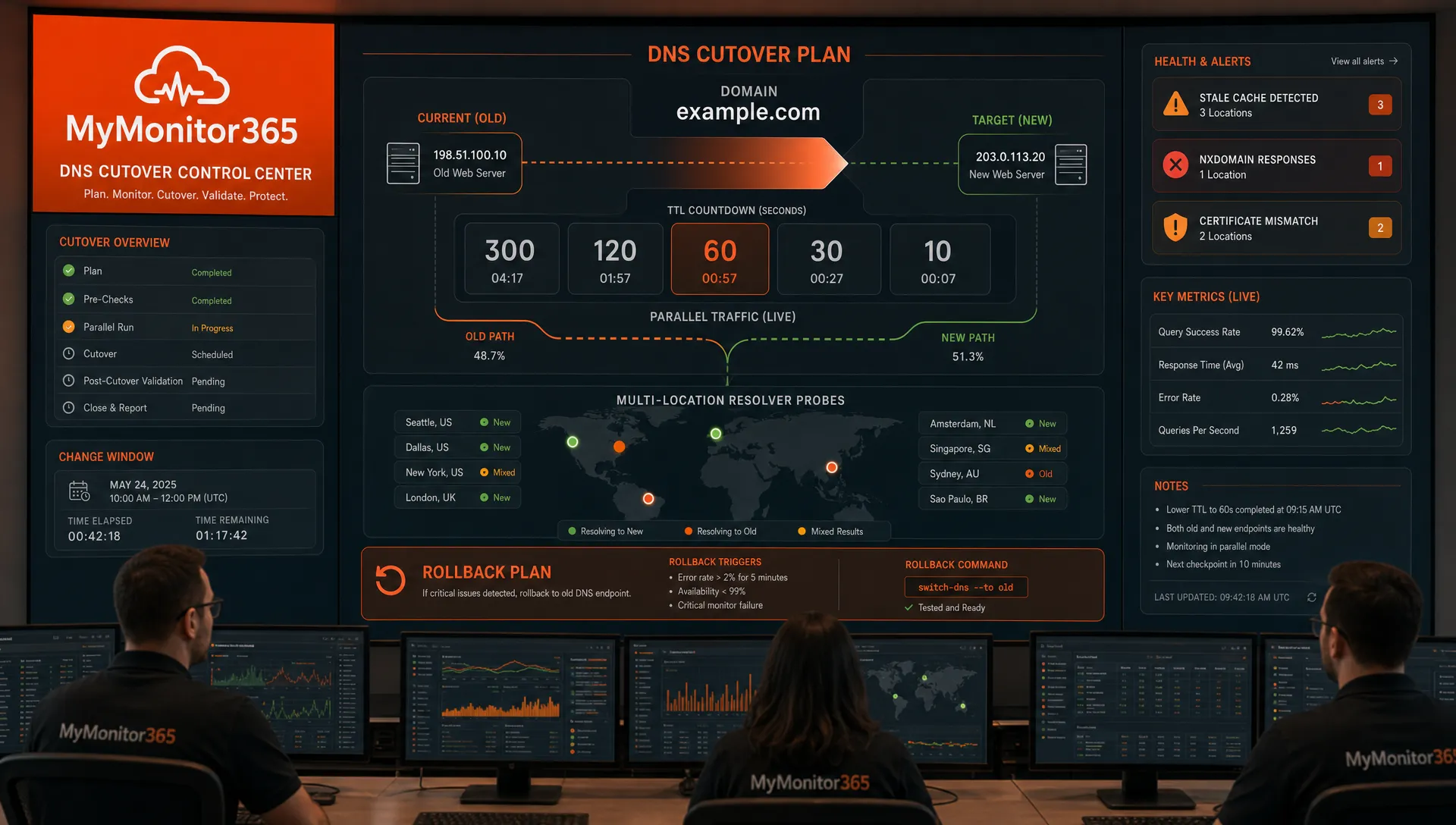
A DNS change can look deceptively small: edit an A record, update a CNAME, move a zone, or point traffic to a new load balancer. In practice, DNS switching is one of the most sensitive operations an IT team can perform because every user, API client, mail system, and third-party integration may depend on it.
The goal is not to make DNS caches disappear. That is impossible. The goal is to design a cutover where old and new paths can coexist, validation starts before the change, monitoring confirms real-world behavior, and rollback remains available until the risk window is closed.
For IT managers, network teams, CIOs, and IT operations leaders, this guide provides a practical playbook for DNS switching without downtime.
What “without downtime” really means in DNS
Zero downtime DNS switching does not mean every resolver updates instantly. Recursive resolvers, browser caches, operating systems, application clients, and ISP DNS layers may all hold answers for different periods of time. Some honor TTLs precisely, while others behave less predictably.
A no-downtime plan accepts this reality. It ensures that both the old destination and the new destination can serve traffic correctly during the transition. If half your users are still reaching the old endpoint and the other half are reaching the new one, both groups should have a working experience.
In practical terms, successful DNS switching means:
- Users do not see failed connections, certificate errors, broken redirects, or unavailable services.
- APIs continue to respond within acceptable latency and error thresholds.
- Mail flow, authentication, and third-party integrations remain intact.
- Monitoring detects partial failures quickly, not after a help desk surge.
- The team can roll back safely if the new path behaves unexpectedly.
This is why DNS switching should be treated as an operational change, not just a zone file update.
Common DNS switching scenarios and their risks
DNS switching can mean several different things. The safest plan depends on what you are moving.
| Switching scenario | Common example | Primary downtime risk |
|---|---|---|
| Record target change | Changing an A, AAAA, or CNAME record to a new endpoint | Old and new services are not both ready to serve production traffic |
| DNS provider migration | Moving authoritative DNS from one provider to another | Missing records, DNSSEC errors, or nameserver delegation mistakes |
| Traffic failover | Redirecting traffic during an outage or maintenance event | Health checks are incomplete or cached answers keep users on a failed path |
| CDN or load balancer migration | Moving from origin IPs to a CDN hostname or new load balancer | TLS, redirects, headers, or origin allowlists are not aligned |
| Mail DNS change | Updating MX, SPF, DKIM, or DMARC records | Email rejection, failed authentication, or delayed delivery |
| Split-horizon change | Updating internal and external DNS differently | Internal apps resolve differently than expected or use stale records |
Before the change window, define exactly which type of switch you are performing. A DNS provider migration has different failure modes than changing a single application CNAME.
Build a DNS switching plan before touching records
Good DNS switching starts with inventory. You need to know what exists, what depends on it, and what must continue to work during the transition.
Start by documenting the current state of the domain or subdomain involved. Include record names, record types, values, TTLs, authoritative nameservers, DNSSEC status, registrar settings, and any automation that updates DNS. If the record points to a CDN, cloud load balancer, firewall, reverse proxy, or third-party service, capture that dependency too.
Then map the user journeys and machine-to-machine flows affected by the switch. A public website may look simple, but the same hostname might support login callbacks, webhooks, mobile apps, customer integrations, monitoring probes, and admin portals. A record that seems low-risk can become high-risk when a legacy system depends on it.
For a broader foundation on resilient DNS design, review how to configure DNS for better reliability and uptime before planning major cutovers.
Treat the cutover like risk management, not clerical administration. Teams that manage financial exposure often start by identifying what could go wrong before committing resources, and the same mindset appears in practical portfolio risk management guidance. DNS changes deserve that same discipline: understand the downside first, then design controls around it.
Prepare both old and new destinations for parallel operation
The most important rule for DNS switching without downtime is simple: do not depend on an instant cutover.
During the transition, some clients will reach the old destination and others will reach the new one. Your architecture must tolerate that mixed state.
For web applications, confirm that both environments can serve the same hostname and certificate. TLS failures are one of the easiest ways to turn a clean DNS change into an outage. The new endpoint must present a valid certificate for the requested hostname, support the expected TLS versions, and handle redirects consistently.
For APIs, test authentication, rate limits, CORS headers, response codes, request bodies, timeouts, and client compatibility. For stateful applications, check whether sessions, database writes, queues, file uploads, and background jobs behave correctly if traffic is split for a period of time.
For mail systems, confirm that new MX records, SPF includes, DKIM selectors, and DMARC policies are aligned. Do not remove old mail routes too quickly, especially if remote mail servers have cached older MX answers.
Parallel operation also means keeping the old service healthy. A common mistake is to update DNS, see early success, and immediately shut down the old target. That creates avoidable failures for clients still using cached answers.
Lower TTLs early, not during the switch
TTL planning is central to DNS switching. If a record currently has a TTL of 86,400 seconds, lowering it at the moment of cutover does not force existing caches to refresh. Recursive resolvers that already cached the old answer may keep it until the original TTL expires.
Lower TTLs well before the change window. The lead time should be at least the duration of the existing TTL, with extra margin for operational safety. For many production cutovers, teams lower the relevant TTLs 24 to 48 hours before the change, then restore higher TTLs after the transition is stable.
A practical TTL approach looks like this:
| Phase | TTL strategy | Why it matters |
|---|---|---|
| Normal operations | Use a balanced TTL, often several minutes to several hours depending on service criticality | Reduces query load and keeps DNS behavior stable |
| Pre-cutover | Lower TTL before the change window | Allows more clients to refresh quickly once the switch happens |
| Active cutover | Keep TTL low while monitoring behavior | Supports faster rollback if needed |
| Post-cutover | Restore normal TTL after confidence is high | Reduces DNS query volume and operational noise |
Be careful with negative caching too. If you accidentally remove a record or create a temporary NXDOMAIN response, resolvers may cache that failure based on SOA settings. Avoid delete-and-recreate workflows for critical records. Modify known-good records deliberately and verify the result at the authoritative layer first.
Validate the new DNS path before production traffic moves
Before changing public answers, test the new path as directly as possible. For web and API services, you can often validate the destination by overriding local resolution with a hosts file entry, using a test hostname, or querying the new provider’s authoritative nameservers directly.
Do not limit validation to “the page loads.” Production-grade DNS switching requires checking each layer that users depend on.
Use pre-cutover checks for:
- Authoritative DNS responses from the intended nameservers.
- A, AAAA, CNAME, MX, TXT, CAA, and other relevant records.
- HTTPS certificate validity and hostname matching.
- HTTP status codes, redirects, headers, and keyword content checks.
- API response times and expected payload behavior.
- TCP port reachability for non-HTTP services.
- Regional reachability from multiple locations.
- Monitoring, alert routing, and escalation paths.
If you are changing authoritative DNS providers, compare the full zone between the old and new providers. Missing TXT records are easy to overlook and can break email authentication, domain verification, SaaS integrations, or certificate issuance.
DNSSEC deserves special attention. If the domain uses DNSSEC, coordinate DS records at the registrar and confirm the new provider’s signing configuration before delegation changes. A DNSSEC mismatch can make a domain appear broken even when the records themselves are present.
Use a runbook for the actual DNS switch
The cutover should follow a written runbook. This reduces decision fatigue and creates a shared source of truth during a high-attention window.
A simple DNS switching runbook can include these steps:
| Step | Action | Owner | Success signal |
|---|---|---|---|
| 1 | Confirm old and new services are healthy | App or platform team | Synthetic checks pass against both paths |
| 2 | Confirm TTLs have been lowered long enough | DNS owner | Authoritative records show intended TTL |
| 3 | Freeze unrelated DNS and deployment changes | Change manager | No competing changes in the window |
| 4 | Apply the DNS update | DNS owner | Authoritative nameservers return new answer |
| 5 | Validate from multiple resolvers and locations | Network or operations team | Expected records and service checks pass |
| 6 | Watch application, infrastructure, and user-impact metrics | Operations team | Error rates, latency, and availability stay within thresholds |
| 7 | Decide whether to continue, pause, or roll back | Incident commander or change lead | Decision recorded in the change log |
The runbook should also identify who can make the rollback decision. In a real incident, ambiguity wastes time. Decide in advance whether the change lead, incident commander, service owner, or on-call manager has authority to revert.
Monitor the switch from the user’s point of view
DNS switching is not complete when the zone file saves successfully. It is complete when users and systems are reliably reaching the right destination without errors.
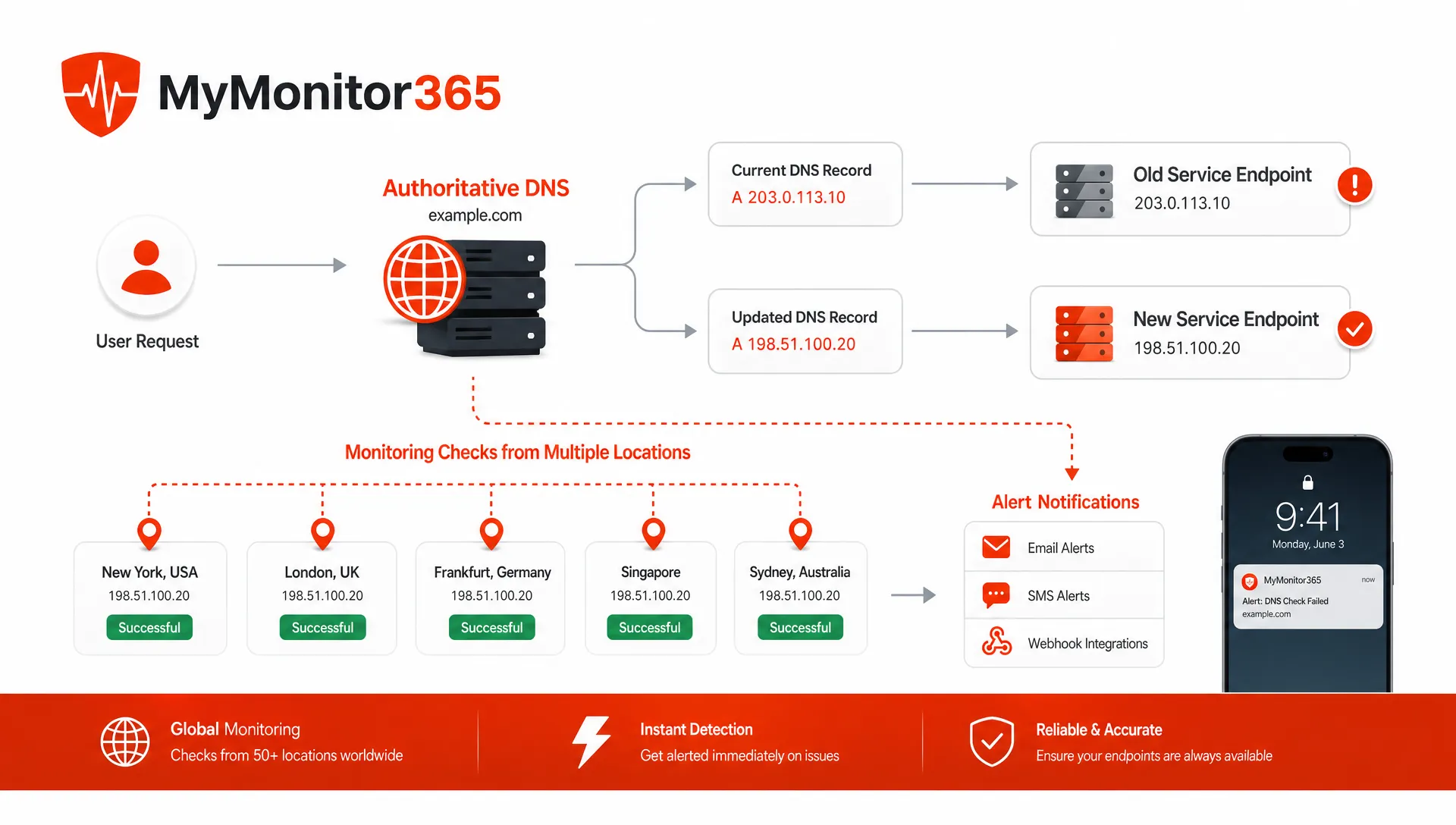
Monitor from multiple locations because DNS and routing failures can be regional. A change may work from your office resolver but fail for users on a different ISP or continent. Multi-location checks help distinguish a global misconfiguration from a localized resolver, routing, or provider issue.
You should monitor DNS answers and service behavior together. DNS can resolve correctly while the application still fails because of TLS, firewall rules, host headers, redirects, backend health, or CDN configuration. Conversely, a service can be healthy while a resolver returns stale or incorrect records.
For faster investigations during and after the cutover, combine record checks with the practices covered in these DNS network monitoring tips for faster troubleshooting.
During the active risk window, watch for:
- NXDOMAIN or SERVFAIL responses.
- Unexpected old record values beyond the expected cache window.
- Incorrect CNAME chains or missing AAAA records.
- TLS certificate errors or hostname mismatches.
- HTTP 3xx redirect loops, 4xx errors, or 5xx errors.
- Elevated latency from specific regions.
- Failed TCP connections or packet loss.
- Email authentication failures after MX or TXT changes.
This is where a monitoring platform such as MyMonitor365 is especially useful. MyMonitor365 supports DNS monitoring, HTTP/API monitoring, SSL checks, ping and ICMP checks, TCP port monitoring, multi-location monitoring, keyword content checks, maintenance windows, alert integrations, audit logs, and two-factor authentication. Those layers help teams see whether the DNS answer changed correctly and whether the service behind it is actually usable.
Keep rollback boring and fast
A rollback plan is not a sign that the team expects failure. It is a reliability control.
For DNS switching, rollback usually means restoring the previous record value or nameserver delegation while keeping TTLs low until stability returns. But rollback only works if the old destination remains operational. If the previous infrastructure is already decommissioned, rollback becomes a rebuild, not a revert.
Before the cutover, confirm that rollback records are documented and accessible. Keep old certificates valid, old load balancers online, old firewall rules intact, and old provider access available. If the change involves a DNS provider migration, maintain access to both providers until the transition is fully verified.
Also define rollback triggers. Do not wait for subjective discomfort. Use measurable thresholds, such as sustained 5xx errors, failed synthetic checks from multiple regions, TLS failures, failed API transactions, or customer-impacting latency.
A good rollback decision is fast because the team already agreed what “bad enough to revert” means.
Avoid the most common DNS switching mistakes
Most DNS cutover failures are preventable. They usually come from assumptions that were not tested under real-world conditions.
One common mistake is changing too many things at once. If you migrate DNS providers, change CDN settings, rotate certificates, deploy application code, and alter firewall rules in the same window, troubleshooting becomes much harder. Separate changes when possible.
Another mistake is forgetting IPv6. If the hostname has both A and AAAA records, users may prefer IPv6 depending on their network. A clean IPv4 switch can still fail for IPv6 clients if the AAAA record points to an unprepared endpoint.
CNAME flattening and apex records can also create surprises. Some DNS providers support ALIAS or ANAME-style behavior at the zone apex, while others do not. If you are changing providers, confirm how apex records are represented and resolved.
DNSSEC and registrar-level delegation are another frequent source of outages. When moving authoritative DNS, nameserver changes at the registrar and DS record changes must be coordinated carefully. A signed zone with incorrect delegation can create resolution failures that look like provider instability but are actually configuration errors.
Finally, many teams stop monitoring too soon. Continue watching old and new paths for at least the maximum expected cache period, and longer for critical services with global users or embedded clients.
A practical DNS switching checklist
Use this checklist before your next production DNS change:
- Inventory all affected records, TTLs, providers, and dependencies.
- Confirm whether the change affects web, API, email, internal DNS, or third-party integrations.
- Prepare old and new destinations for parallel operation.
- Validate TLS certificates, redirects, firewalls, application behavior, and health checks.
- Lower TTLs early enough for existing caches to age out.
- Confirm authoritative DNS answers before relying on recursive resolver results.
- Test from multiple locations and resolver types.
- Prepare rollback records, access, authority, and decision thresholds.
- Keep the old path alive until cached traffic has drained.
- Restore normal TTLs only after the service has remained stable.
For mission-critical systems, DNS switching should be part of a wider resilience program that includes dependency mapping, failover planning, layered monitoring, and clear operational ownership. The more critical the service, the less acceptable it is to rely on manual observation during a change window.
Frequently Asked Questions
How long before DNS switching should I lower TTLs? Lower TTLs at least as early as the current TTL value, with added margin for safety. If the current TTL is 24 hours, lower it 24 to 48 hours before the cutover so many resolvers have time to pick up the shorter TTL.
Can DNS switching ever be truly instant? Not across the public internet. Authoritative DNS changes can happen quickly, but recursive resolvers and client caches may continue using old answers until their cache expires. Design for a mixed-traffic period instead of assuming instant propagation.
What is the safest TTL during a cutover? Many teams use short TTLs such as 60 to 300 seconds during a planned cutover, but the right value depends on provider limits, query volume, criticality, and rollback needs. Avoid setting TTLs so low that they create unnecessary DNS query load.
Should I delete old DNS records after the switch? Do not delete old records or decommission old infrastructure immediately. Keep the previous path available until the maximum cache window has passed and monitoring confirms that clients have moved successfully.
What should I monitor during DNS switching? Monitor DNS resolution, HTTP or API availability, SSL certificate validity, TCP port reachability, ICMP reachability where relevant, latency, error rates, and user-impacting application behavior from multiple locations.
Make DNS changes safer with MyMonitor365
DNS switching without downtime comes down to preparation, validation, monitoring, and rollback. The technical record change may take seconds, but the reliability work happens before and after that moment.
MyMonitor365 helps IT and MSP teams monitor DNS, uptime, SSL, HTTP/API endpoints, TCP ports, ping checks, and network services from multiple locations with instant alerts and practical operational visibility. If your team wants to catch DNS and service issues before users notice, start with MyMonitor365 and make your next DNS cutover a controlled change instead of a risky guess.
Hashtags: #DNSSwitching #DNSMonitoring #UptimeMonitoring #NetworkMonitoring #ITOperations #MSP #InfrastructureMonitoring #IncidentResponse