
How to Configure DNS for Better Reliability and Uptime
Learn how to configure DNS for better reliability and uptime with TTL planning, redundancy, DNSSEC safeguards, monitoring, and change control.
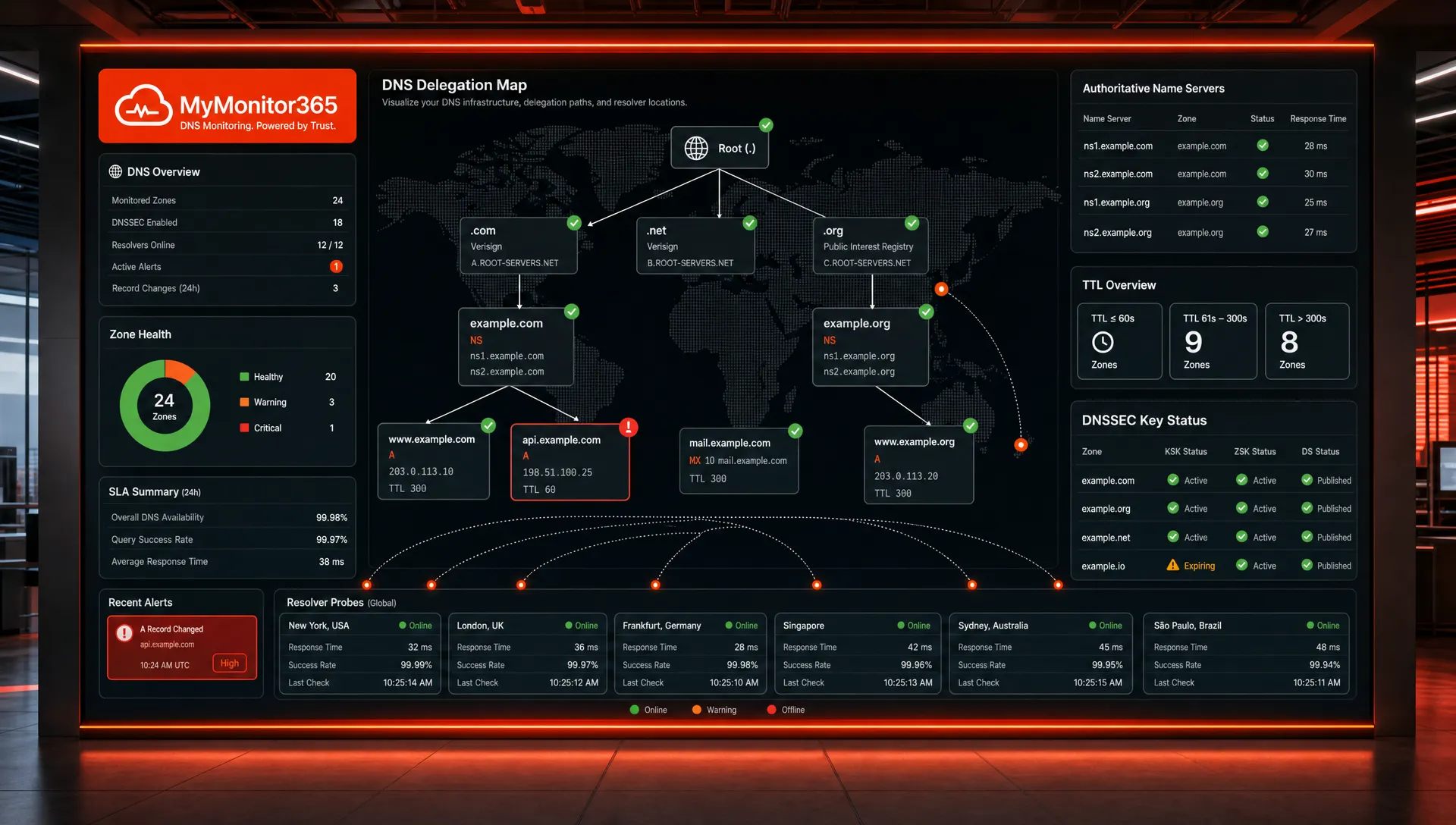
DNS is easy to underestimate until it breaks. A website can have healthy servers, valid application code, and plenty of bandwidth, yet still appear down if users cannot resolve the right hostname to the right destination.
For IT operations teams, DNS reliability is not just a domain registrar task. It is part of uptime engineering. The way you configure DNS affects failover speed, incident detection, certificate renewals, email delivery, API availability, and user trust.
This guide explains how to configure DNS for better reliability and uptime using practical controls: resilient authoritative DNS, intentional TTLs, safe DNSSEC operations, change management, and monitoring from multiple locations.
What reliable DNS really means
Reliable DNS has three goals. First, users should receive correct answers consistently. Second, DNS changes should happen predictably, without long periods of inconsistent behavior. Third, your team should know quickly when delegation, records, DNSSEC, or name resolution starts failing.
That means DNS reliability is bigger than adding an A record. It includes the full resolution path from registrar delegation to authoritative name servers, recursive resolver behavior, cached responses, DNSSEC validation, and the application behind the resolved address.
A good DNS configuration answers these questions clearly:
- Which provider hosts authoritative DNS for each domain and zone?
- Which records are critical to revenue, customer access, internal operations, or security?
- How quickly can you safely redirect traffic during an incident?
- Who can change DNS, and how are changes reviewed?
- How do you detect incorrect records, stale responses, and resolution failures?
If you are troubleshooting active failures, review the common causes in this guide to DNS resolution failures. The rest of this article focuses on how to configure DNS proactively so those failures are less likely to occur.
Start with a DNS inventory before changing records
Before you optimize TTLs or add failover records, document what already exists. Many outages happen because teams change one record without understanding a dependency somewhere else.
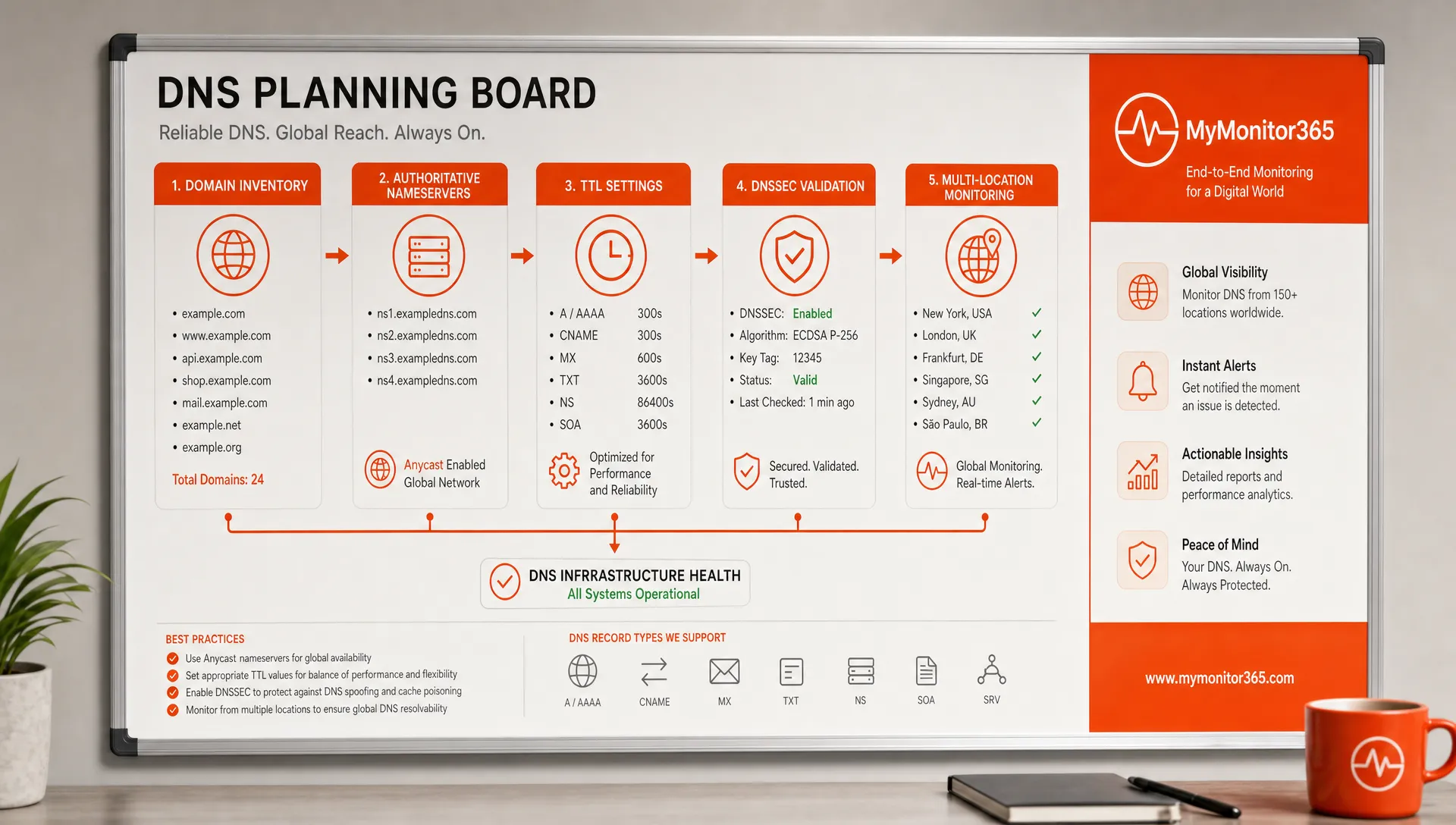
Create an inventory of every production domain and subdomain, including public websites, APIs, VPN portals, SaaS verification records, email records, CDN hostnames, identity provider endpoints, and customer-facing vanity domains. Record the authoritative DNS provider, registrar, nameservers, DNSSEC status, record type, TTL, owner, and business impact.
For IT managers and MSPs, ownership matters as much as the record values. A domain used by marketing might rely on IT-managed DNS. A line-of-business API might be changed by a DevOps team. A customer portal might depend on a vendor CNAME. Without clear ownership, a routine web launch can turn into an outage.
The inventory should also separate the DNS control plane from the DNS serving plane. The control plane is where changes are made, such as your DNS provider console or API. The serving plane is the authoritative infrastructure answering queries. A provider outage in either layer can affect your ability to operate, but the failure modes are different.
Configure authoritative DNS for resilience
Authoritative DNS is the source of truth for your zone. If your authoritative name servers are unreachable, misdelegated, or inconsistent, recursive resolvers may be unable to retrieve current answers.
For production domains, use multiple authoritative name servers. These should be operated in a way that reduces shared failure risk. Many managed DNS providers automatically place name servers across separate networks and regions, but you should verify this rather than assume it.
For mission-critical domains, some organizations use secondary DNS with a different provider. This can improve resilience, but only if zone transfers, synchronization, DNSSEC, and operational ownership are configured correctly. A poorly maintained secondary DNS setup can create inconsistent answers, which is worse than a simple configuration.
Also confirm that registrar delegation matches your active authoritative name servers. It is common to see old NS records left at the registrar after a migration. Recursive resolvers follow parent-zone delegation, so a mismatch between registrar configuration and your DNS provider can create intermittent failures.
| DNS area | Reliability goal | Configuration guidance |
|---|---|---|
| Authoritative nameservers | Keep the zone reachable | Use multiple name servers with provider diversity when justified by business impact. |
| Registrar delegation | Ensure resolvers find the right authority | Keep parent NS records aligned with the active DNS provider. Remove stale nameservers. |
| Zone consistency | Prevent different answers from different servers | Validate that all authoritative servers return the same records and SOA serial. |
| Access control | Reduce accidental or malicious changes | Use MFA, role-based access, and audit logs where available. |
| Change workflow | Make DNS updates predictable | Require review for critical records and document rollback steps. |
For high-value services, DNS should be part of your broader availability strategy, not a separate checklist. The same principle applies when you protect mission critical services from downtime: map dependencies, reduce single points of failure, and monitor the signals that users depend on.
Set TTLs intentionally, not randomly
TTL, or time to live, tells recursive resolvers how long they may cache a DNS response. Short TTLs can make planned changes and incident redirects faster. Longer TTLs can reduce query load and improve stability if your authoritative DNS has a temporary issue.
There is no universal TTL that fits every record. A stable MX record may not need the same TTL as an API endpoint that participates in failover. A CNAME pointing to a CDN might be controlled differently from a direct A or AAAA record.
For production services, use TTLs that match the operational behavior you need. If you expect to change a record during an incident, a TTL of several days will slow you down. If a record almost never changes, a very short TTL may create unnecessary dependency on frequent DNS lookups.
| Record or use case | Common TTL approach | Why it helps |
|---|---|---|
| Stable NS, MX, TXT verification records | Longer TTLs, often hours | These records rarely change and benefit from cache stability. |
| Customer-facing web or API records | Moderate TTLs, often 300 to 3600 seconds | Balances change speed with resolver caching efficiency. |
| Planned migration records | Temporarily lower TTL before the cutover | Allows faster propagation once the actual change is made. |
| Failover-sensitive records | Lower TTL when DNS-based failover is part of the design | Reduces the time users may receive stale destinations. |
| Negative responses | Controlled through SOA-related caching behavior | Prevents missing-record errors from lingering longer than expected. |
Negative caching is especially important. If a resolver receives an NXDOMAIN response, it may cache that negative answer based on zone settings. RFC 2308 defines negative caching behavior, which is why accidentally publishing or removing a record can continue to affect users after you correct the mistake.
When planning a migration, lower TTLs well before the change. If a record currently has a 24-hour TTL and you lower it five minutes before changing the destination, many resolvers may still hold the old answer for the original TTL. Lower the TTL at least one previous TTL period before the cutover, then restore a normal value after the change is stable.
Design records to support uptime
DNS records should be simple, intentional, and easy to reason about during an incident. Complexity increases troubleshooting time, especially when multiple vendors are involved.
For web applications, minimize long CNAME chains. Each additional lookup adds another dependency and another place where configuration can drift. CNAME chains can also complicate debugging when a CDN, hosting provider, or SaaS platform changes its target hostnames.
For apex domains, understand how your provider handles ALIAS, ANAME, or CNAME-flattening behavior. Standard DNS does not allow a CNAME at the zone apex when other records such as NS and SOA must exist. Many DNS providers offer apex aliasing features, but implementation details differ, so document how yours behaves.
For email, configure MX records with deliberate priorities and ensure the target hostnames resolve correctly. A backup MX that is misconfigured or unmanaged can create mail delays or security exposure. SPF, DKIM, and DMARC records should be owned by the teams responsible for email security and deliverability.
For APIs and internal services, match DNS design to the application failover model. DNS can help redirect users, but it does not guarantee active connection draining or application health. If a record points to an unhealthy endpoint, DNS may continue to resolve successfully while users still experience an outage. That is why DNS checks should be paired with HTTP, API, TCP, and SSL checks.
Use DNSSEC, but operate it carefully
DNSSEC helps protect DNS answers from certain types of tampering by allowing resolvers to validate cryptographic signatures. It is valuable for domains where trust and integrity are important, but it must be managed carefully.
A DNSSEC mistake can make a domain fail validation for users on validating resolvers. Common issues include incorrect DS records at the registrar, expired signatures, incomplete key rollovers, or DNS providers changed without updating DNSSEC delegation.
The ICANN DNSSEC overview explains why DNSSEC matters and how it strengthens DNS trust. From an operations perspective, the key point is simple: DNSSEC is not a one-time checkbox. It needs change control and monitoring.
Before enabling DNSSEC on a critical domain, confirm that your DNS provider supports automated signing, safe key rollover, and clear instructions for registrar DS records. During DNS provider migrations, include DNSSEC steps in the runbook. If you forget to remove or update DS records, the domain may appear broken even when normal DNS records look correct.
Coordinate DNS with SSL, HTTP, and application availability
DNS uptime does not equal service uptime. A hostname can resolve correctly while the website returns a 500 error, the TLS certificate is expired, or the application redirects users to the wrong domain.
DNS and TLS are tightly connected. If a DNS change points traffic to a new platform, that platform must already have a valid certificate for the hostname. The certificate should include the correct subject alternative names, chain, and hostname match. If you use automated certificate issuance, confirm that DNS validation or HTTP validation will still work after changes.
This is why certificate monitoring is part of DNS reliability. A clean DNS cutover can still become an outage if HTTPS fails. For a deeper checklist, see these HTTPS certificate checks that prevent costly outages.
The same applies to HTTP content and API behavior. After a DNS change, validate not only that the hostname resolves, but that the expected page, keyword, API response, authentication flow, or health endpoint is reachable.
Build DNS change management into every launch
Many DNS incidents happen during ordinary work: a website redesign, vendor migration, SaaS onboarding, email platform change, or cloud failover test. The technical change may be small, but the blast radius can be large.
A DNS change runbook should define the record being changed, current value, new value, current TTL, desired TTL, validation method, rollback value, approver, change window, and communication plan. For critical records, take screenshots or export the zone before the change.
When a launch involves external teams, make DNS responsibilities explicit. If a site launch is tied to marketing, web design, or lead generation work, coordinate timing and validation with the implementation partner. For example, organizations working with a specialized web partner such as Louisville Web Lab should still keep IT responsible for delegation, DNSSEC, certificates, and monitoring while the web team validates the user-facing experience.
Do not rely on manual browser checks alone. A browser may show cached results, use a specific resolver, or hide partial regional failures. Validate from multiple networks and, where possible, query authoritative servers directly.
A practical DNS change sequence looks like this:
- Lower TTL in advance if a fast cutover is needed.
- Confirm new destination is ready, including SSL and application health.
- Export or document the current zone state.
- Make the DNS change during the approved window.
- Validate resolution from multiple locations and resolvers.
- Confirm HTTP, API, SSL, and user workflows.
- Restore normal TTL after stability is confirmed.
- Keep monitoring active for delayed failures or vendor-side changes.
Monitor DNS continuously from multiple locations
DNS reliability needs monitoring because not every failure is visible from your office network. A resolver in one region may fail while another works. One authoritative nameserver may serve stale records. A registrar or DNS provider change may alter delegation without triggering an application alert.
Monitor at several layers. Check that critical hostnames resolve to expected values. Monitor DNS record changes so your team knows when important records are modified. Pair DNS checks with HTTP or API monitoring, SSL checks, ping, and TCP port checks so you can tell whether the problem is name resolution, network reachability, TLS, or the application itself.
Multi-location monitoring is especially useful for DNS because it catches regional resolver behavior and network-specific failures. If only one location fails, the incident may involve local ISP routing, resolver caching, or a regional provider issue. If every location fails, the problem is more likely to be authoritative DNS, delegation, DNSSEC, or the destination service.
MyMonitor365 supports DNS change monitoring, HTTP/API monitoring, SSL security checks, ping and ICMP checks, TCP port monitoring, multi-location monitoring, maintenance windows, and alert integrations. That combination helps IT operations teams connect DNS symptoms to the rest of the infrastructure stack instead of treating every alert as a standalone event. For a broader monitoring model, see how to monitor network infrastructure without blind spots.
DNS reliability checklist for IT operations
Use this checklist when reviewing a production domain:
- Confirm registrar delegation points only to active authoritative nameservers.
- Verify all authoritative nameservers return consistent answers.
- Document owners for critical A, AAAA, CNAME, MX, TXT, and SRV records.
- Match TTLs to the record's change frequency and failover requirements.
- Lower TTLs before planned migrations, not at the moment of cutover.
- Validate DNSSEC records, especially DS records during provider changes.
- Avoid unnecessary CNAME chains for critical services.
- Confirm SSL certificates are valid before redirecting traffic.
- Monitor DNS resolution and record changes from multiple locations.
- Pair DNS monitoring with HTTP, API, TCP, ping, and SSL checks.
The most reliable DNS environments are boring in the best way. Records are documented, changes are reviewed, failover behavior is understood, and monitoring tells the team what changed before users start reporting errors.
Frequently Asked Questions
How do I configure DNS for better uptime? Start with accurate delegation, multiple authoritative nameservers, sensible TTLs, careful DNSSEC management, documented change workflows, and continuous monitoring from multiple locations. Then pair DNS checks with HTTP, SSL, TCP, and application monitoring.
What TTL should I use for production DNS records? It depends on the record. Stable records often use longer TTLs, while web and API records commonly use moderate TTLs such as 300 to 3600 seconds. If you need fast cutover or DNS-based failover, use lower TTLs and lower them well before the change.
Does a low TTL guarantee instant DNS failover? No. A low TTL can reduce cache duration, but resolvers may behave differently and existing connections may stay open. DNS failover should be combined with load balancing, health checks, application readiness, and monitoring.
Can DNSSEC cause downtime? Yes, if it is misconfigured. Incorrect DS records, failed key rollovers, or expired signatures can cause validating resolvers to reject DNS answers. DNSSEC improves trust, but it needs operational discipline.
Why monitor DNS if my DNS provider is reliable? Even reliable providers cannot prevent every registrar issue, accidental record change, DNSSEC error, regional resolver problem, or vendor misconfiguration. Monitoring gives your team early warning and faster root cause isolation.
Make DNS reliability measurable
DNS should not be a hidden dependency that only gets attention during incidents. Treat it as part of your uptime program, with documented ownership, tested changes, and continuous monitoring across the services users actually depend on.
With MyMonitor365, IT and MSP teams can monitor DNS changes alongside HTTP/API availability, SSL security, ping, TCP ports, multi-location checks, maintenance windows, and alert integrations. Start with a free plan, no credit card required, and make DNS reliability visible before users notice a problem.
Hashtags
#DNS #UptimeMonitoring #NetworkMonitoring #ITOperations #MSP #InfrastructureMonitoring #DNSSEC