
How to Monitor DNS in Split-Horizon Environments
Monitor DNS in split-horizon environments with view-specific probes, answer checks and alerts that expose private failures and public DNS leaks.

A public DNS check can pass while employees cannot reach the same application over VPN. To monitor DNS in a split-horizon environment, you need checks from each relevant network view, queries through the resolvers those users actually use and separate expectations for public and private answers. A successful lookup alone is not enough.
The practical goal is to verify three things: the right clients receive the right records, internal information stays private and failures can be traced to the correct DNS layer. This guide turns those requirements into a monitoring plan for network and IT operations teams.
Why one successful lookup proves too little
Split-horizon DNS, also called split DNS, returns different answers for the same name according to the query’s context. That context might be the source network, the recursive resolver, a VPN connection or an association with a cloud private zone.
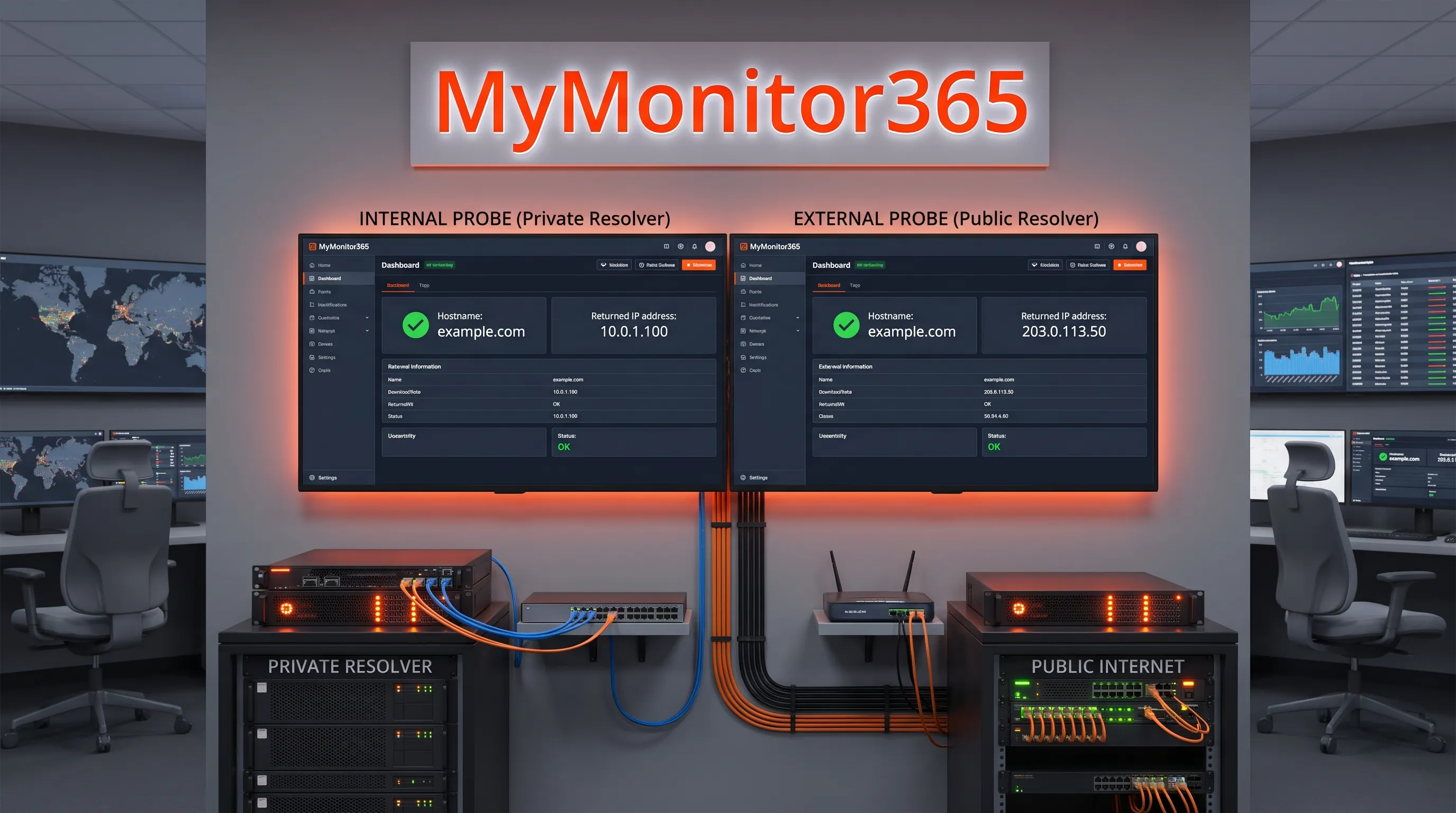
For example, app.example.com might resolve to 203.0.113.20 publicly and 10.20.0.20 internally. Both answers are correct, but only for their intended audiences. These addresses and names are illustrative, not live test targets.
A public probe cannot prove that a branch office can resolve the private address. An internal probe cannot establish that an internal-only hostname stays absent from public DNS. Even two internal locations may need different expectations when they use separate forwarders or private-zone associations.
Treat each DNS view as a separate service contract. Record its expected answers, resolver path, authorized clients and operational owner before configuring alerts.
Where to monitor DNS in each network view
Place probes where they reproduce meaningful differences in resolution, not merely in different geographic regions. Start with this matrix and adapt it to your topology:
| Probe context | Resolution path | Example expectation | Failure it can reveal |
|---|---|---|---|
| Public network | External recursive resolver | Public address for app.example.com |
Public resolution failure |
| Corporate LAN | Assigned corporate resolver | Private address for the same name | Internal zone or forwarding failure |
| Connected VPN client | VPN-selected resolver and routing | Intended private answer | Split-tunnel or DNS-policy error |
| Cloud workload network | Cloud resolver and private-zone associations | Environment-specific private answer | Missing association or forwarding rule |
| Public network, internal-only name | External recursive resolver | Documented negative response | Accidental public publication |
Test each redundant corporate resolver independently as well. A healthy resolver can otherwise hide a failed peer until clients switch to it.
For MSPs, keep customer expectations, probe credentials and incident routing separate. Identical private addresses across customers do not imply identical DNS views.
Maintain stable labels such as tenant, site, view and resolver. These labels should appear in alerts so an operator can identify the affected audience without reconstructing the probe configuration.
Build assertions that check correctness
A check that accepts any NOERROR response can miss an empty answer, an incorrect address or a broken CNAME destination. To monitor DNS meaningfully, validate the response against the contract for that view.
For critical names, capture the query name and type, response code, returned record set, resolution time and resolver identity. Preserve enough of the CNAME chain to identify an unexpected destination. For direct authoritative queries, also inspect whether the response is authoritative.
Define comparisons according to how the service operates:
- Fixed records: Compare the complete expected record set, ignoring answer order.
- Dynamic destinations: Validate approved CNAME targets or another documented policy instead of pinning a CDN to one IP address.
- Internal-only names: Require the intended public negative response and alert on unauthorized positive answers.
- Dual-stack services: Check A and AAAA records independently so an unexpected IPv6 path cannot bypass the intended private route.
Distinguish NXDOMAIN, which says the name does not exist, from a NOERROR response with no requested record, often called NODATA. Either may be intentional, but your check should know which behavior is expected.
TTL deserves context rather than a universal alarm value. Recursive caches normally return decreasing TTLs. Flag values outside an approved range or unexpected changes at the authoritative source, not every difference between successive cached responses.
Use explicit queries to isolate the failing layer
When you monitor DNS through both recursive and authoritative paths, you can separate a broken source of truth from a broken delivery path. Run these illustrative commands from an authorized internal location, replacing the addresses with your own:
# Query the recursive resolver used by this network view.
dig @10.20.0.53 app.example.com A +time=2 +tries=1

# Query the internal authoritative server without requesting recursion.
dig @10.20.0.54 app.example.com A +norecurse

# Compare the client-to-resolver path over TCP.
dig @10.20.0.53 app.example.com A +tcp +time=2 +tries=1
The authoritative test is valid only if that server hosts the relevant zone and permits the intended view from the probe’s source. An access-denied response from an unauthorized source does not establish an outage.
| Observation | Next area to investigate |
|---|---|
| Authoritative answer is correct, recursive answer is wrong | Cache, forwarding rules or resolver policy |
| One recursive resolver fails while its peer succeeds | That resolver’s health or upstream access |
| Internal checks fail while public checks pass | Private zone, internal transport or conditional forwarding |
| Explicit DNS queries pass but the application fails | Client resolver selection, local cache or application behavior |
| Matched UDP queries fail while TCP succeeds | Transport filtering, fragmentation or path-specific behavior |
A TCP query here tests the probe-to-resolver leg, not every upstream connection. Likewise, dig +trace follows delegation and does not reproduce a client’s private forwarding path. Use the broader DNS resolution failure troubleshooting guide when the evidence points beyond a view-selection problem.
Test the client path, not just the server
Explicit resolver queries deliberately bypass part of the client’s selection logic. That makes them useful for diagnosis, but insufficient for end-to-end assurance.
To monitor DNS as users experience it, add a synthetic test that uses the operating system’s normal name-resolution path, followed by an HTTPS request to the intended service. Verify the certificate and a meaningful application response rather than accepting any listening endpoint.
On VPN clients, test connected and disconnected states. Check which domains the VPN sends to corporate resolvers and what happens during reconnection. If browsers or applications use DNS over HTTPS independently of the operating system, include that behavior in your policy and testing.
Cloud environments introduce another boundary. In Amazon Route 53, a matching private hosted zone can produce NXDOMAIN for a missing name or record type rather than falling back to the public zone. AWS documents this behavior in its private hosted zone considerations. A newly associated private zone can therefore break names that still work publicly.
Use an application-path check alongside explicit DNS queries so you can distinguish a correct resolver from an incorrectly configured client.
Set intervals and alerts separately for each view
Choose polling frequency according to the outage detection objective, query budget and ability to respond. A reasonable starting configuration for a critical service is a check every 60 seconds, with an availability alert after three consecutive failures. This is a starting point, not a DNS standard.
When you monitor DNS across dissimilar sites, baseline latency separately for each resolver path. A branch office traversing a WAN should not inherit the same response-time threshold as a probe beside a data-center resolver. Alert on sustained degradation against a documented service objective rather than one isolated slow query.
Route different failures differently. Repeated timeouts should reach the resolver or network owner. An unauthorized public answer for an internal-only name warrants security review as well as operational response. A private address changing during an approved deployment may need verification rather than an immediate incident.
Do not require global agreement before alerting. A failed office or VPN view can be a genuine outage even when every public probe passes. Correlate related failures to reduce duplicate pages while preserving the affected-view labels.
Maintenance windows should match the intended scope. Suppressing a private-zone change should not silence public exposure checks or unrelated resolver failures.
Detect cross-view leakage and security drift
Availability is only one part of the contract. Watch for internal hostnames, private addresses or unauthorized destinations appearing in the public view. Also flag internal answers that unexpectedly send users through a public endpoint, particularly when that changes authentication, access controls or data handling.
Test representative internal-only names explicitly from outside the network. Do not interpret an unexpected positive answer as proof of compromise: wildcard records, approved migrations and configuration mistakes can also explain it. Preserve the evidence and compare it with the authorized zone configuration.
Review changes to conditional forwarders, private-zone associations and DNS view access controls. A legitimate record can reach the wrong users when the selection policy changes, even if the record itself is untouched.
Keep synthetic monitoring distinct from DNS query-log analysis. Synthetic checks can operate with a small inventory of test names. Full query logs may expose internal naming conventions, client addresses and user activity. Restrict access, define retention periods and avoid collecting user identifiers that are unnecessary for troubleshooting.
Teams that monitor DNS for multiple customers should also document where probe results and logs are stored. Separate access by tenant and ensure external alert payloads do not unnecessarily disclose sensitive internal names.
Choose tools around the access you actually need
dig provides explicit queries, response inspection and transport comparisons without a paid monitoring subscription. Scripts can turn those checks into recurring tests, but your team then owns scheduling, state tracking, retries, credential handling and alert delivery.
Internal scheduled runners are useful when private resolvers must remain unreachable from the internet. Keep their configuration under version control and restrict their network access to what the checks require. Probe health should have its own signal; silence from an offline runner is not evidence that DNS is healthy.
Managed platforms can reduce operational overhead, but their capabilities and plan limits vary. Before choosing one to monitor DNS, confirm support for explicit resolver selection, expected-answer assertions, private network access, result retention and the required number of checks.
MyMonitor365 provides DNS change monitoring, multi-location monitoring and alert integrations alongside HTTP/API and SSL checks. Those capabilities can support a broader monitoring strategy, but do not assume that public multi-location probes can query private resolvers. Validate the required private connectivity and view-specific assertions before assigning them that responsibility.
Validate changes through the relevant caches
A corrected zone does not guarantee that every client immediately receives the new answer. Existing positive and negative cache entries may remain valid.
RFC 2308’s negative caching rules explain why a previously missing name can remain unavailable after it is created. Lowering a TTL during an incident does not retroactively shorten entries already cached under an earlier value.
For each planned change, record the affected views, old and new expected answers, relevant TTLs, rollback criteria and owner. Query the authoritative source first, then each production resolver path and finally the application from representative clients. Avoid flushing every cache before gathering evidence, since that can hide which path served the stale answer.
When you monitor DNS during a migration, temporarily permit both destinations only if both are safe and usable. Remove that allowance once the transition is complete, or it becomes a permanent blind spot. The DNS switching checklist provides a broader preparation and rollback workflow.
Frequently asked questions
Can public monitoring detect private DNS failures? Not directly. Public checks validate public resolution. Private-view coverage requires a probe with the appropriate network access, resolver configuration and view-selection context. Keep public checks as an independent control for external availability and accidental publication.
Should every location receive the same DNS answer? No. Different answers can be the intended behavior. Compare each response with its view-specific policy rather than treating disagreement between internal and external probes as an incident.
How do I monitor DNS without cached results hiding a problem? Combine ordinary recursive checks with authorized direct authoritative queries. The former reproduce cached resolution behavior; the latter inspect the source. Cache-busting names are useful only when the zone is deliberately configured for them, since random nonexistent names test negative responses instead of the application’s actual record.
Does DNSSEC guarantee that the correct split-horizon answer reaches users? No. DNSSEC validates signed DNS data, not whether a client selected the intended corporate resolver or private view. Signed public zones and private overrides need an explicit validation design and tests for unexpected SERVFAIL responses.
Put a view-aware baseline in place
Start with one critical application. Document its public, office, VPN and cloud expectations, then deploy a check in each distinct resolution path. Assign an owner and escalation route before expanding coverage.
Use MyMonitor365 for its supported DNS change, multi-location and related service checks, with approved internal testing wherever private-view coverage requires it. The objective is evidence that each audience reaches the intended service, not simply a dashboard full of successful lookups.
#DNS #DNSMonitoring #SplitHorizonDNS #NetworkMonitoring #ITOperations