
Audit Log Monitoring That Finds Risky Changes Faster
Audit log monitoring helps IT teams find risky changes faster. Learn what to track, alert on and connect to uptime signals for compliance.
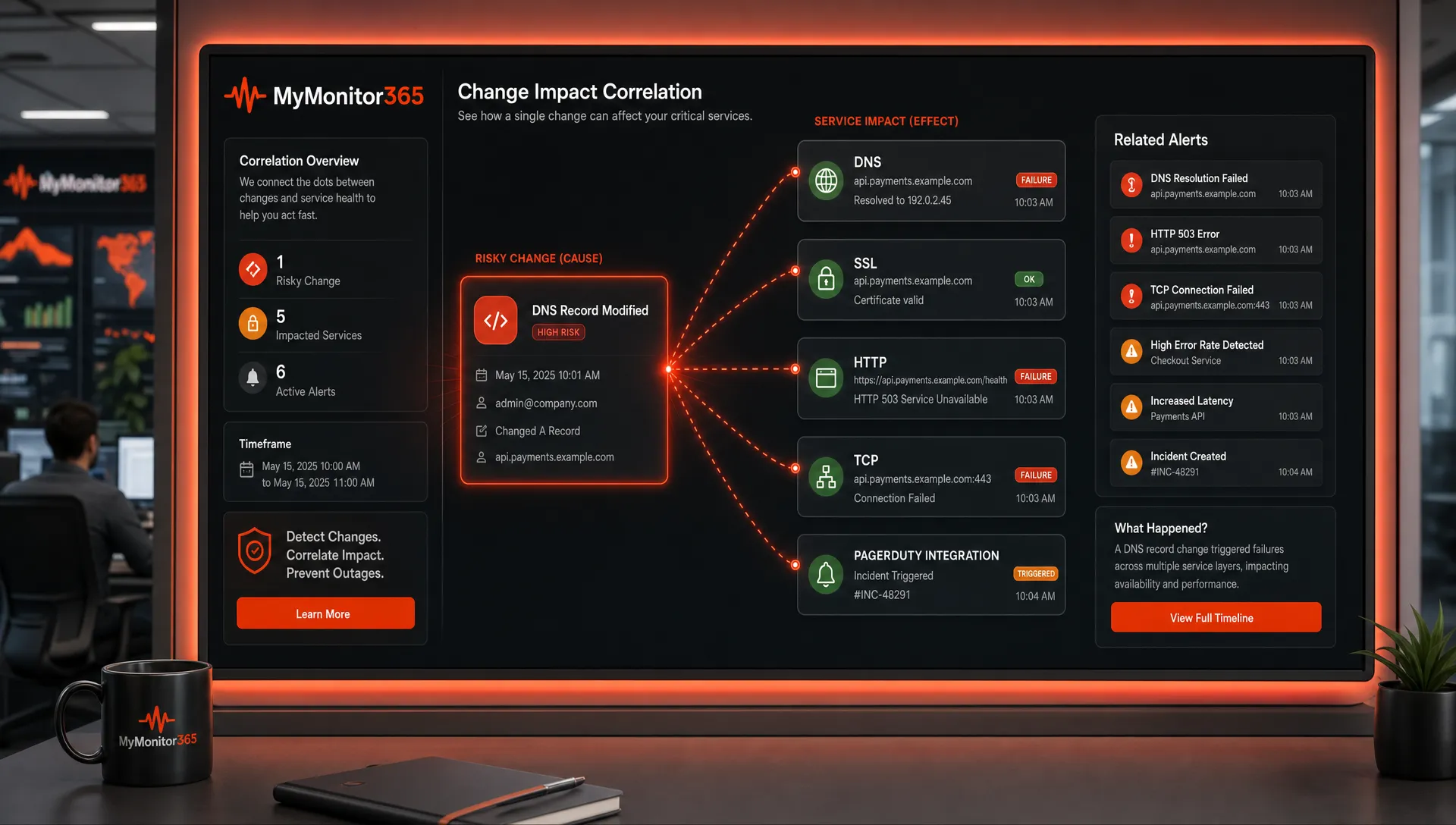
A risky infrastructure change rarely looks dramatic at first. It may be a DNS record edited during a routine migration, an SSL certificate replaced without the full chain, a firewall rule opened for testing or an admin permission granted to speed up a support request. The problem is not that teams make changes. The problem is that risky changes often move faster than the people responsible for reviewing them.
That is where audit log monitoring becomes operationally valuable. Audit logs preserve the record of who did what, when it happened and where it happened. Monitoring turns that record into a live risk signal, so IT operations, network teams, security teams and MSPs can detect suspicious or outage-prone changes before they become compliance findings or user-facing incidents.
For compliance, the goal is not simply to store more logs. The goal is to prove accountability, detect unauthorized activity quickly and show that critical systems are controlled. For operations, the goal is even more direct: find the change that created risk, understand its blast radius and route the alert to the right owner fast.
What audit log monitoring should actually catch
Audit log monitoring is the continuous review of system, application, identity, infrastructure and administrative activity logs for events that indicate risk. Good monitoring does not alert on every change. It focuses on changes that could affect confidentiality, integrity, availability or compliance.
For IT and network teams, the most important audit events often sit at the intersection of configuration and service health. A record change in DNS, a certificate update, an API key deletion or a monitoring rule disabled by accident can all create impact even when the original action was authorized.
Common high-value audit events include:
- Privileged account creation, deletion or role escalation
- Changes to DNS zones, name servers, MX records, CAA records or critical A records
- SSL certificate replacement, renewal failure or hostname mismatch activity
- Firewall, VPN, TCP port or access control changes
- Changes to monitoring coverage, alert routing or maintenance windows
- Two-factor authentication disabled or modified for privileged users
- API tokens, service accounts or integration credentials created or revoked
- Failed administrative actions repeated across sensitive systems
The best audit log monitoring programs classify these events by business impact. A change to a lab server and a change to the public DNS record for your customer portal should not generate the same urgency.
Why stored audit logs are not enough for compliance
Many organizations already collect audit logs, but collection alone creates a false sense of control. Logs that are only reviewed after an incident or during an audit rarely help teams prevent disruption. By the time someone searches the archive, the outage has already occurred or the control gap has already been exposed.
This is especially risky for regulated environments and MSPs supporting multiple clients. If a customer asks when a risky change occurred, who approved it and how quickly your team responded, a pile of raw logs is not enough. You need searchable evidence, alert history, ownership notes and a clear timeline.
For a broader operational view, this is why network and security monitoring must work together. Audit logs show the human or system action. Network, DNS, SSL, HTTP and TCP monitoring show whether that action affected availability or exposure.
Define what makes a change risky
Not every change deserves an incident response. The first step is agreeing on a practical risk model that operations, security and compliance stakeholders can use consistently. The model should consider the asset, the actor, the action, the timing and the downstream effect.
| Risk factor | Why it matters | Example |
|---|---|---|
| Privilege level | High-privilege actions can bypass normal controls | Global admin grants another user elevated rights |
| Critical asset | Some services have direct revenue, safety or compliance impact | DNS change affects a customer login domain |
| Change timing | Changes outside maintenance windows are harder to validate | Firewall rule modified at 2:00 a.m. without a ticket |
| Actor behavior | Unusual activity can indicate compromise or misuse | Admin account changes settings from a new location |
| Service impact | A configuration change is more urgent if monitoring shows failure | SSL update followed by HTTPS errors from multiple locations |
| Control impact | Some actions weaken governance even if no outage occurs | Two-factor authentication disabled for a privileged user |
This model keeps audit log monitoring focused. Instead of overwhelming responders with every administrative event, it highlights the changes that increase operational or compliance risk.
Build an audit log monitoring pipeline around context
Fast detection depends on context. A raw log entry might say that a record was updated, but responders need to know whether the record belongs to a critical service, whether the change was expected and whether the service is still reachable.
Start by standardizing the minimum fields that matter for triage. At a minimum, each monitored event should preserve the actor, action, target resource, timestamp, source system, source IP or location when available, before and after values if available, linked ticket or change request and alert outcome.
Then enrich events with operational context. A DNS change becomes more meaningful when the domain is tagged as customer-facing. A TCP port change becomes more urgent when the host supports a production API. A certificate event becomes critical when the certificate protects a payment flow, SSO endpoint or managed client environment.
This is where MSPs and distributed IT teams gain speed. With consistent tagging and ownership, alerts can be routed by client, service, severity or support tier instead of landing in one generic queue.
Alert rules that surface risky changes faster
Audit alerts should be specific enough to prompt action. Generic notifications such as admin changed settings are usually too vague. A stronger rule explains why the action matters and what the responder should check next.
Useful alert patterns include:
- A privileged role is assigned outside an approved change window
- A DNS record for a critical domain changes without a matching maintenance window
- An SSL certificate event is followed by HTTPS failures or certificate validation errors
- A monitoring check is disabled, deleted or muted on a production service
- A TCP port opens on an internet-facing host that was previously closed
- Two-factor authentication settings change for an administrator or service owner
- Multiple failed administrative actions occur before a successful privileged change
Alerting should also account for planned work. Maintenance windows are not just a way to suppress noise. They help separate expected change from risky change. If a DNS migration is scheduled, the system can still monitor for failure, but the alert can include the approved maintenance context instead of treating the activity as unexplained.
Correlate audit logs with uptime and network signals
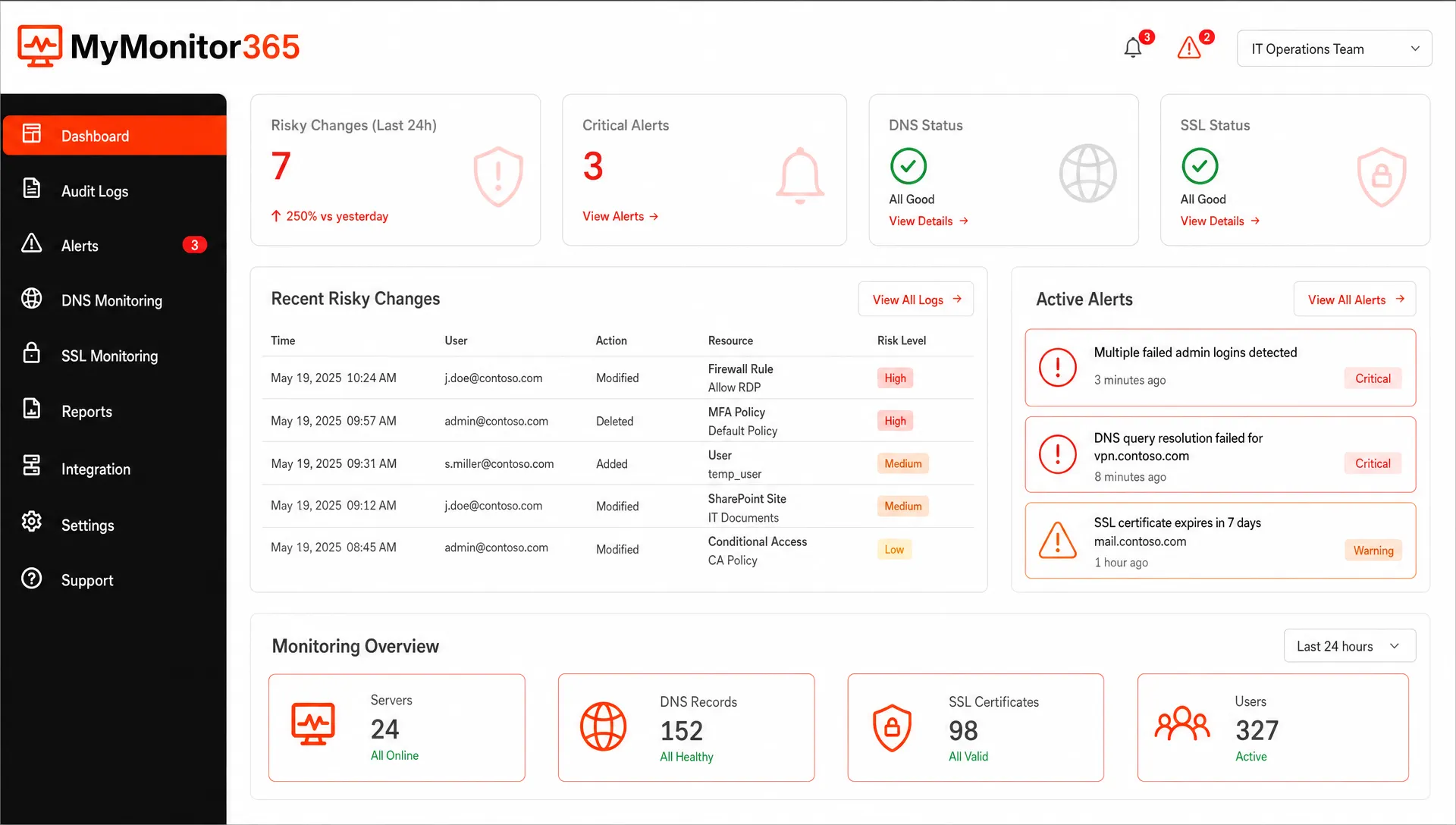
Audit log monitoring becomes much more useful when it is tied to external service monitoring. A configuration change may look safe inside an admin console, but users experience the result from outside your network. That is why HTTP/API checks, ping and ICMP checks, TCP port monitoring, SSL security checks, DNS change monitoring and multi-location monitoring are so valuable.
Consider a simple example. An administrator updates a DNS A record at 10:07. At 10:09, DNS checks from several regions detect inconsistent resolution. At 10:11, HTTPS checks begin failing because traffic reaches a host with the wrong certificate. If those signals live in separate tools, responders spend time reconstructing the timeline. If they are correlated, the likely root cause appears in minutes.
MyMonitor365 is designed for this operational layer: tracking uptime, performance and security across websites, servers, DNS, SSL and network services while alerting teams when something changes or fails. When audit logs are reviewed alongside those signals, IT teams can reduce guesswork and move from detection to validation faster.
Turn audit logs into compliance evidence
Compliance teams care about audit logs because they prove control activity. Operations teams care because they reveal what changed. The strongest programs serve both groups with the same evidence trail.
A compliance-ready audit log monitoring process should be able to answer five questions quickly:
- Who made the change?
- What system, record, policy or asset changed?
- When did the change occur?
- Was the change authorized or linked to a ticket?
- What was the operational result and response?
This evidence supports common expectations across frameworks and regulations such as SOC 2, ISO 27001, PCI DSS, HIPAA and GDPR. Requirements differ, but the underlying discipline is similar: maintain accountability, protect sensitive systems, restrict privileged actions and show that incidents or exceptions are handled.
For organizations modernizing infrastructure under data governance, sovereignty or hybrid cloud requirements, auditability should be built into the architecture instead of bolted on later. Partners focused on digital sovereignty and data governance programs can help align platform decisions with long-term compliance, resilience and operational independence goals.
Shorten triage with a repeatable workflow
When a risky change alert fires, responders should not have to invent the process. A repeatable workflow reduces panic and improves evidence quality.
Start with identity validation. Confirm whether the actor is an expected user, service account or automation process. If the actor is unknown, disabled, inactive or unusually privileged, escalate immediately.
Next, verify authorization. Look for a linked ticket, change request, maintenance window or deployment record. If the change was planned, the alert may become a validation task. If not, treat it as an exception until proven safe.
Then assess service impact. Check affected DNS records, SSL certificates, HTTP endpoints, APIs, TCP ports and network reachability. Multi-location checks are useful here because they show whether the issue is local, regional or global.
Finally, document the outcome. Record whether the change was approved, rolled back, escalated or accepted. This step often feels administrative during an incident, but it becomes valuable during compliance review and post-incident analysis.
If your teams struggle with handoffs, define shared severity and ownership rules before the next incident. The guidance in how security and infrastructure teams can share alerts is especially relevant for organizations where audit, security and network responsibilities overlap.
Metrics that prove audit log monitoring is working
A mature audit log monitoring program should improve both speed and control. The following metrics help CIOs, IT managers and operations leaders evaluate progress without relying on vague claims.
| Metric | What it measures | Why it matters |
|---|---|---|
| Mean time to detect risky change | Time between change event and alert | Shows whether monitoring is timely |
| Mean time to validate | Time between alert and confirmation of expected or unexpected change | Indicates triage efficiency |
| Unauthorized change rate | Percentage of risky changes without matching approval | Reveals change governance gaps |
| Critical asset coverage | Percentage of high-value systems with audit and service monitoring | Shows monitoring completeness |
| Alert precision | Percentage of alerts that require action | Helps reduce noise and fatigue |
| Evidence retrieval time | Time needed to produce a change timeline for audit or review | Measures compliance readiness |
These metrics also help security leaders measure and improve security posture because they connect control activity to measurable risk reduction.
Common mistakes that slow detection
The most common audit log monitoring failures are not technical. They are design problems. Teams collect the wrong events, route alerts to the wrong people or treat all changes as equal.
One mistake is monitoring only identity events while ignoring infrastructure changes. Identity logs are critical, but risky operational changes often happen in DNS, SSL, network access, API configuration and monitoring settings.
Another mistake is alerting without ownership. If no team knows who should respond to a DNS record change, the alert creates awareness but not action. Ownership should be defined for each critical service and client environment.
Teams also weaken detection when they suppress too much during maintenance. Planned windows should reduce noise, not hide evidence. During a maintenance window, continue collecting audit events and service checks so responders can confirm that the work had the intended result.
A final mistake is treating audit log monitoring as a compliance-only task. Compliance is important, but the same signals can prevent outages, shorten root cause analysis and reveal compromised accounts sooner.
A practical 30-day rollout plan
A full audit log monitoring program can take time, but meaningful progress can happen in 30 days if the scope is realistic.
In the first week, identify your critical services and map the systems that can change them. Include DNS providers, certificate management, cloud consoles, firewalls, identity platforms, monitoring tools and key application admin panels.
In the second week, define risky change categories. Focus on privileged access, DNS, SSL, exposed services, monitoring coverage and authentication controls. Agree on severity levels and escalation paths.
In the third week, connect audit events to operational checks. For each critical domain or service, confirm that uptime, DNS, SSL, HTTP/API, ping or TCP monitoring is in place where appropriate.
In the fourth week, test the workflow. Run controlled changes, validate alert routing, confirm maintenance window behavior and verify that evidence can be retrieved quickly. Use the results to tune thresholds before expanding coverage.
Frequently Asked Questions
What is audit log monitoring? Audit log monitoring is the continuous review of activity records from systems, applications, identity platforms and infrastructure tools to detect risky, unauthorized or compliance-relevant changes.
How is audit log monitoring different from log storage? Log storage preserves records for investigation or audit. Monitoring evaluates those records in near real time, applies risk rules and alerts the right team when a change needs attention.
Which audit events should IT teams prioritize first? Start with privileged access changes, DNS updates, SSL certificate changes, firewall or TCP port modifications, monitoring coverage changes and two-factor authentication changes for administrators.
How does audit log monitoring support compliance? It helps prove accountability by showing who changed what, when it happened, whether it was authorized and how the organization responded. That evidence is useful for audits, incident reviews and control testing.
Can audit log monitoring help reduce outages? Yes. Many outages start with configuration changes. When audit events are correlated with DNS, SSL, HTTP, TCP and multi-location monitoring, teams can identify the likely cause faster.
Find risky infrastructure changes before they become incidents
Audit logs tell you what changed. Infrastructure monitoring tells you whether that change affected users, customers or critical services. Combining both gives IT operations and MSP teams a faster path from alert to root cause.
MyMonitor365 helps teams monitor HTTP/API endpoints, ping and ICMP, TCP ports, SSL, DNS and multi-location availability with instant alerts, maintenance windows, audit logs, two-factor authentication and collaboration integrations. Start with the free plan, no credit card required, and build a monitoring foundation that supports uptime, security and compliance.
Suggested hashtags: #AuditLogMonitoring #Compliance #ITOps #NetworkMonitoring #SecurityMonitoring #MSP