
How SSL Deep Inspection Affects Performance and Privacy
Learn how SSL deep inspection affects latency, throughput and privacy, plus practical controls for safer TLS inspection in enterprise networks.
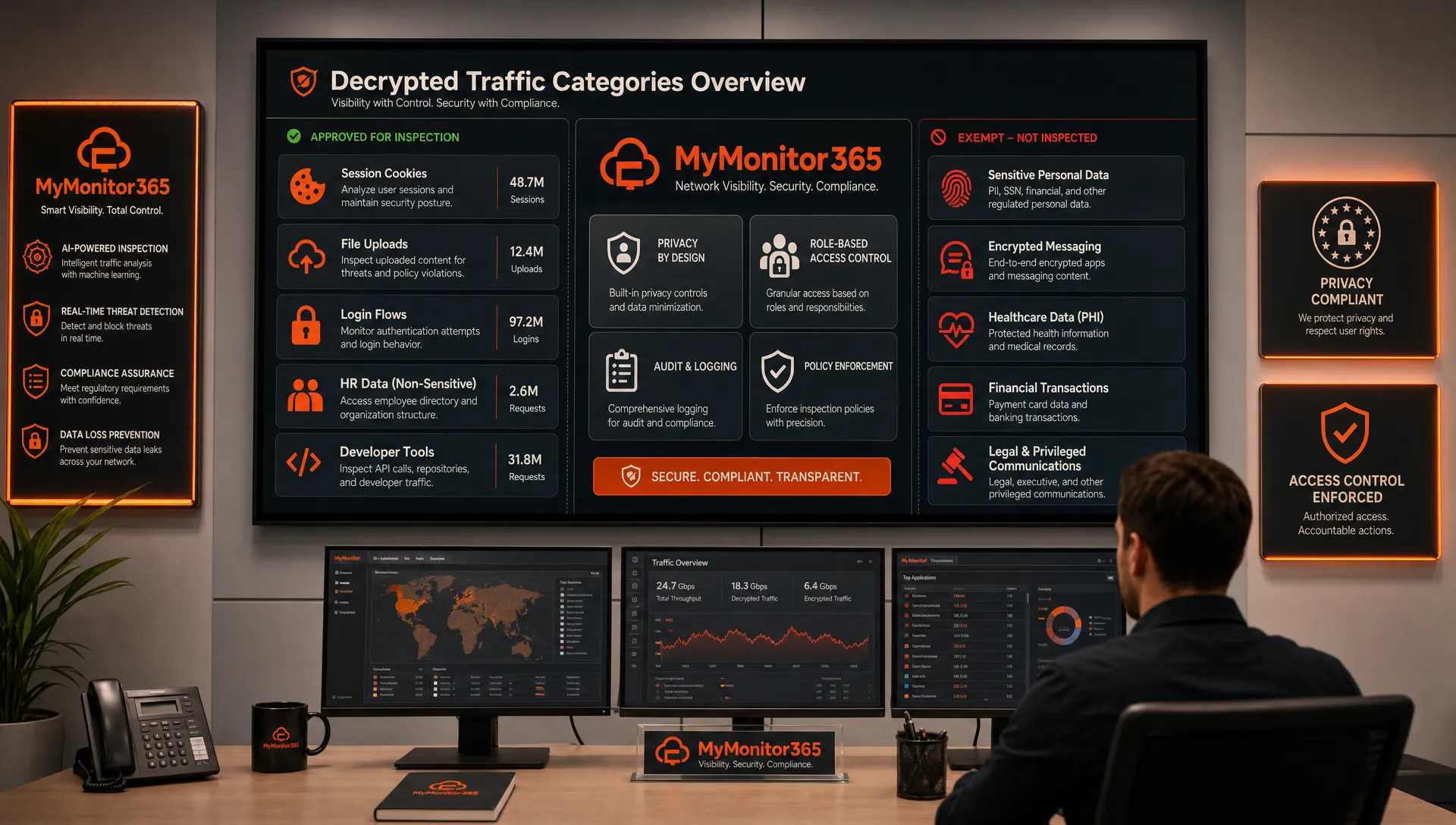
SSL deep inspection sits at the uncomfortable intersection of security, performance and privacy. For IT operations teams, it can expose malware callbacks, data exfiltration attempts and policy violations that would otherwise hide inside encrypted HTTPS sessions. It can also add latency, break applications and create a new place where sensitive data becomes visible.
That tradeoff matters more in 2026 because nearly every business workflow now depends on encrypted web traffic. SaaS applications, APIs, identity providers, developer tools, payment flows, remote work platforms and AI services all rely on TLS. Inspecting that traffic can improve security visibility, but only if the inspection layer is designed, monitored and governed with the same rigor as any other critical infrastructure.
What SSL deep inspection actually does
SSL deep inspection is the practice of decrypting encrypted traffic at a controlled security device, inspecting the plaintext content, then re-encrypting it before forwarding it to the destination. It is often called TLS inspection, HTTPS inspection or TLS interception. Technically, most modern encrypted web traffic uses TLS rather than the older SSL protocol, but the phrase SSL deep inspection remains common in enterprise networking.
A typical flow looks like this:
- A user connects to an HTTPS website or application.
- A firewall, secure web gateway or proxy intercepts the session.
- The inspection device presents a substitute certificate signed by an internal trusted certificate authority.
- The device decrypts the traffic, applies security controls and re-encrypts the session to the destination.
This approach is different from checking whether a website has a valid certificate. Certificate monitoring validates availability, expiry, chain trust, hostname matching and TLS configuration from the outside. Deep inspection changes the path of live user traffic. If your team needs a refresher on the certificate side of the equation, it helps to review the fundamentals of SSL and TLS certificate basics before designing an inspection policy.
How SSL deep inspection affects performance
The main performance cost comes from doing cryptographic work twice. Instead of one TLS session between client and server, the inspection device handles one encrypted session with the client and another with the destination. That adds CPU load, memory pressure, certificate generation overhead and session state tracking.
For light web browsing, the difference may be hard for users to notice. For high-volume API traffic, video, file transfer, developer package downloads or applications that open many short-lived sessions, the overhead can become visible quickly.
| Performance area | What changes with inspection | Operational symptom |
|---|---|---|
| TLS handshakes | The proxy negotiates TLS on both sides | Slower first byte time and login delays |
| CPU and memory | Encryption and inspection consume appliance resources | Throughput drops during peak business hours |
| Connection reuse | Some applications lose efficient session reuse | More handshakes and higher latency |
| Protocol support | HTTP/2, HTTP/3 or modern ciphers may be downgraded | Apps feel slower after traffic passes through the proxy |
| Failure handling | The inspection layer becomes another dependency | Intermittent timeouts, resets and hard to trace errors |
The hidden issue is not always average latency. Tail latency matters more for user experience and incident diagnosis. A proxy that adds 40 milliseconds under normal load may add several seconds during signature updates, high traffic periods or certificate validation delays. From the user perspective, that looks like a slow SaaS application. From the network perspective, it may look like congestion. From the application owner perspective, it may look like a backend problem.
Deep inspection can also interfere with application behavior. Certificate pinning, mutual TLS, nonstandard TLS extensions and strict security controls may reject the substitute certificate. Some applications fail cleanly with a clear certificate error. Others retry, fall back to slower paths or produce intermittent failures that are difficult for a help desk to reproduce.
How SSL deep inspection affects privacy
SSL deep inspection turns encrypted traffic into readable content inside your environment. That is its purpose, but it also makes the inspection point a sensitive data processing location.
Depending on your environment, decrypted traffic can include session cookies, file uploads, private messages, health information, financial records, source code, employee data, customer identifiers and authentication flows. Even if the inspection device does not store full payloads, logs and metadata may still reveal enough to create privacy or compliance concerns.
Strong inspection governance should answer several practical questions:
- Who can access decrypted payloads, logs and incident samples?
- How long are inspection logs retained?
- Are credentials, tokens and personal data masked where possible?
- Which categories of traffic are exempt from inspection?
- How are employees and contractors informed about monitoring?
- Which vendors process or store inspection data?
Privacy risk is not limited to regulated industries. IT teams increasingly handle traffic connected to legal review, executive communications, HR systems, developer repositories and competitive strategy. Inspection decisions also matter for SaaS categories that handle strategic content. If teams send prompts, market intelligence or brand data to AI visibility platforms such as CapstonAI, the inspection policy should classify that traffic according to its business sensitivity, not merely as generic web browsing.
The security tradeoff: more visibility, larger trust boundary
SSL deep inspection can strengthen security programs by allowing malware scanning, DLP, threat intelligence matching, command and control detection and policy enforcement across encrypted channels. Without it, many perimeter tools only see destination metadata and certificate information.
The tradeoff is that inspection expands the trust boundary. Your internal root certificate authority, proxy configuration, private keys, logging pipeline and administrator access controls become high-value assets. If attackers compromise the inspection layer, they may gain visibility into traffic that users and applications assume is protected.
Misconfiguration is another risk. A poorly configured proxy can weaken TLS by allowing outdated protocols, accepting bad upstream certificates or failing open when validation fails. That creates the worst possible outcome: users lose end-to-end encryption, but the organization does not gain reliable protection.
A safer design treats SSL deep inspection as a selective control rather than a universal default. Inspect where the risk justifies the cost and exempt traffic where privacy, reliability or application design makes inspection unsafe.
Which traffic should you inspect or exempt?
There is no single policy that works for every organization. IT managers and CIOs should align the inspection model with business risk, legal requirements and operational tolerance.
| Traffic category | Common approach | Reason |
|---|---|---|
| General web browsing | Inspect with policy controls | High exposure to phishing, malware and risky downloads |
| Unknown or newly registered domains | Inspect or restrict | Higher likelihood of abuse in many threat models |
| Banking, healthcare and legal portals | Often exempt | Sensitive personal or regulated data |
| Identity provider traffic | Use caution | Token handling and login flows are sensitive |
| Developer repositories and package managers | Use caution or exempt selectively | Certificate pinning, source code exposure and build reliability risks |
| Internal apps using mutual TLS | Usually exempt | Interception can break authentication guarantees |
| Guest Wi-Fi | Usually avoid deep inspection | Consent, device trust and certificate deployment are difficult |
The right answer can vary by geography, workforce model and industry. A managed service provider may need one default policy for its own employees and separate policies for client environments. A healthcare provider may exempt more categories than a manufacturing company. A financial services firm may require more granular logging controls and tighter administrator separation.
How to measure the performance impact
SSL deep inspection should never be enabled at scale without baselines. Measure before deployment, during pilot and after policy changes. The goal is not only to prove that the proxy can handle peak throughput, but to detect when inspection changes the user experience or masks the true source of an outage.
Start with these measurements:
- Latency to critical SaaS applications from user networks.
- TLS handshake time, DNS time and time to first byte for key endpoints.
- Proxy CPU, memory, concurrent sessions and queue depth.
- Error rates for HTTP 4xx, HTTP 5xx, resets and timeouts.
- Certificate validation failures on both client-facing and upstream connections.
- Differences between inspected paths and external monitoring locations.
External monitoring is especially useful because it shows what the service looks like without your internal inspection layer. Internal synthetic checks show what employees experience. Comparing both views helps isolate whether an issue sits with the SaaS provider, your DNS path, the inspection device, your network or a certificate chain problem.
For web services and APIs, combine inspection telemetry with HTTP and HTTPS monitoring so teams can separate application failures from network, TLS and policy-related failures. This matters when a provider is up globally but failing for your inspected users.
Monitoring controls that make SSL deep inspection safer
The inspection layer should be monitored as critical production infrastructure. Treat it like a dependency for authentication, business applications and incident response.
Key controls include capacity alerts, certificate authority expiry tracking, policy change auditing, upstream certificate validation, DNS monitoring, port checks and synthetic transactions through inspected and non-inspected paths. Maintenance windows should be coordinated with business owners because proxy upgrades, certificate rotation and rule updates can affect many applications at once.
MyMonitor365 supports IT operations teams with monitoring across HTTP/API endpoints, SSL, DNS, ping/ICMP, TCP ports and multi-location checks. In an SSL deep inspection rollout, those checks can help validate whether public endpoints remain healthy, whether certificates are nearing expiry and whether network services are reachable from more than one location.
This is also where security and operations need a shared workflow. If a firewall policy update breaks access to a critical SaaS tool, it is both a security change and an availability incident. The same applies when DNS changes, certificate warnings or proxy capacity issues affect users. Aligning responsibilities is easier when network and security monitoring work together instead of living in separate queues.
Practical rollout checklist for IT operations
A controlled rollout reduces the chance of privacy surprises and performance incidents. Before enabling SSL deep inspection broadly, define success criteria and failure criteria. A policy that catches threats but causes repeated outages will not survive business pressure.
Use this checklist as a starting point:
- Build a traffic classification model before writing proxy rules.
- Define exempt categories for sensitive, regulated and technically incompatible traffic.
- Pilot with a limited user group that represents real workloads.
- Baseline performance before and after inspection.
- Monitor the inspection platform as a production dependency.
- Review administrator access, audit logs and log retention.
- Document how users report certificate errors and broken applications.
- Revisit the policy after major SaaS, identity or network architecture changes.
Do not treat the first deployment as the final design. TLS versions, application architectures, browser behavior and compliance expectations continue to change. Inspection policies should be reviewed on a scheduled basis and after major incidents.
Frequently Asked Questions
Is SSL deep inspection the same as SSL certificate monitoring? No. SSL certificate monitoring checks whether certificates are valid, trusted, correctly matched and not close to expiry. SSL deep inspection intercepts live encrypted traffic so a security device can decrypt and inspect content before re-encrypting it.
Does SSL deep inspection always slow down traffic? It usually adds some overhead because the inspection device performs extra TLS negotiation, decryption, inspection and re-encryption. The impact may be small on well-sized infrastructure, but it can become significant during peak traffic, heavy API use or proxy saturation.
What traffic should not be inspected? Many organizations exempt banking, healthcare, legal, HR, identity, certificate-pinned, mutual TLS and guest network traffic. The final list should reflect your legal obligations, privacy policy, business risk and application requirements.
Can SSL deep inspection improve security posture? Yes, when implemented carefully. It can reveal threats hidden in encrypted traffic and support DLP or malware controls. It can also increase risk if root certificates, logs, proxy policies or administrator permissions are poorly managed.
How can IT teams tell whether inspection is causing an outage? Compare monitored results from inspected user paths, non-inspected paths and external locations. If the public service is healthy but users behind the proxy see certificate errors, timeouts or resets, the inspection layer becomes a likely investigation point.
Final takeaway
SSL deep inspection is neither automatically good nor automatically harmful. It is a powerful control that must be scoped, monitored and governed. For IT managers and network teams, the best policy balances threat visibility with application reliability and privacy expectations.
Use deep inspection where it meaningfully reduces risk. Exempt traffic where decryption creates unacceptable privacy exposure or technical instability. Most importantly, monitor the full chain, including DNS, certificates, network reachability, HTTPS behavior and the inspection infrastructure itself.
Hashtags: #SSL #Security #TLS #NetworkMonitoring #ITOperations #Privacy #UptimeMonitoring