
Network Root Cause Analysis That Shortens Outages
Improve network root cause analysis with practical monitoring layers, triage steps, and RCA habits that help IT teams shorten outages.
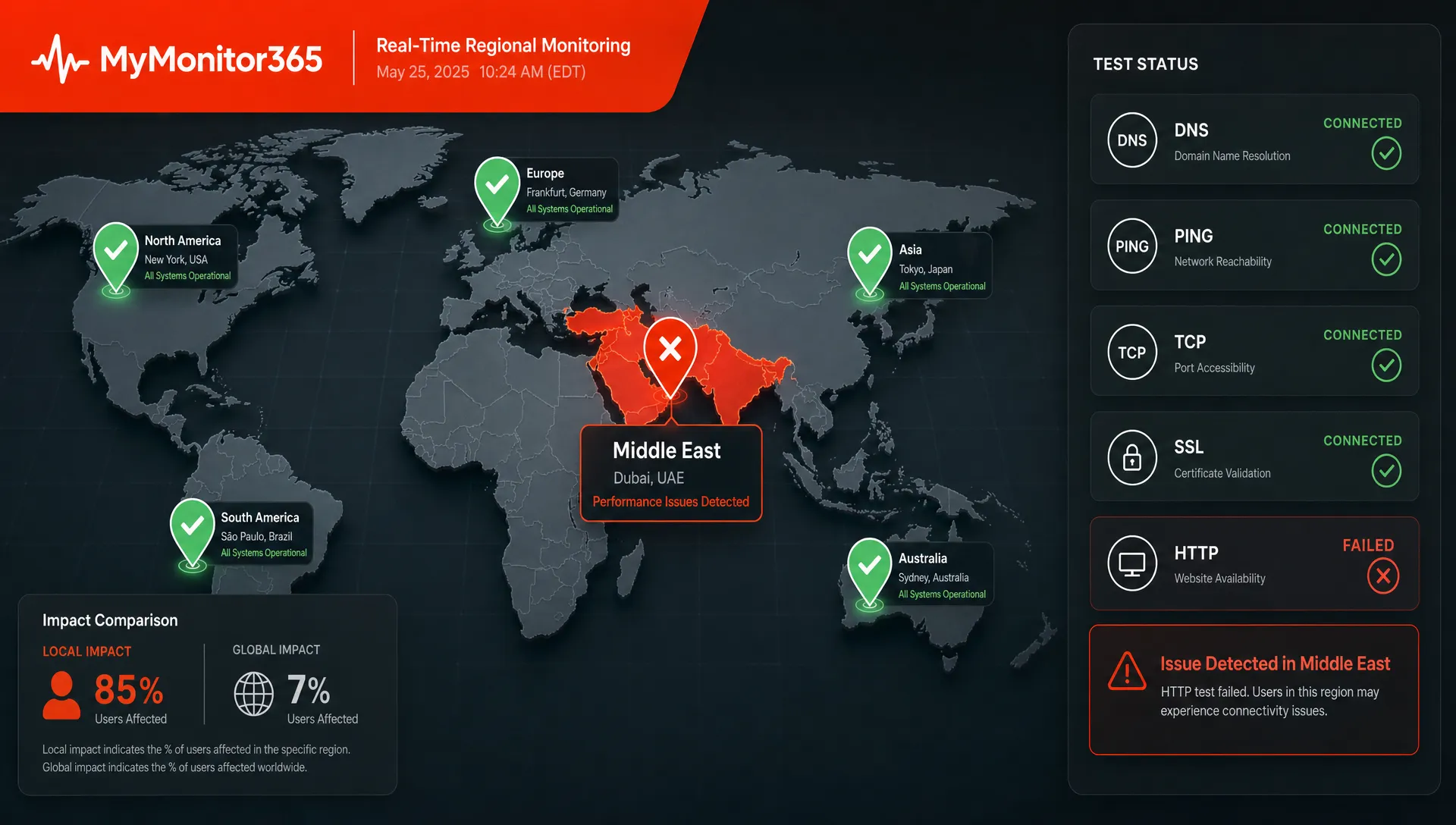
When a network incident starts, the fastest team is not always the team with the most tools. It is usually the team that already knows which signals matter, which dependencies are critical and which evidence will prove or disprove a likely cause.
That is the practical goal of network root cause analysis. It is not a long postmortem document created days after an outage. It is a disciplined way to move from symptom to verified cause with less guesswork, fewer false escalations and better evidence at every handoff.
For IT operations, network teams, MSPs and CIOs, better RCA has a direct business value: shorter outages, clearer accountability and fewer repeat incidents. The process starts before the outage, with monitoring coverage that is built for diagnosis rather than simple up or down checks.
What network root cause analysis means in an outage
Network root cause analysis identifies the underlying condition that caused or materially contributed to service degradation. In real incidents, that condition may be technical, procedural or both. A failed DNS change, an expired certificate, a saturated WAN link, a firewall rule, a routing issue or a broken deployment can all look like “the site is down” to the user.
Good RCA separates related concepts that are often mixed together during a stressful bridge call.
| Concept | What it answers | Example |
|---|---|---|
| Symptom | What is visible right now? | API requests are timing out from several regions. |
| Impact | Who or what is affected? | Customers in North America cannot complete logins. |
| Trigger | What event started the incident? | A DNS record was changed 12 minutes before alerts began. |
| Root cause | What underlying condition caused the failure? | The record pointed traffic to an inactive endpoint. |
| Contributing factor | What made detection or recovery slower? | No DNS change alert reached the on-call channel. |
| Corrective action | What reduces recurrence? | Add DNS monitoring, approval steps and a rollback check. |
During the incident, your objective is not to produce a perfect historical explanation. Your objective is to narrow the fault domain fast enough to restore service safely. After recovery, the same evidence becomes the foundation for a blameless RCA that prevents the same failure from returning.
Why network outages take longer than they should
Outages often drag on because teams are forced to troubleshoot from incomplete signals. A ping failure tells you something is unreachable, but it does not tell you whether the problem is DNS, TLS, HTTP routing, a firewall, a regional carrier issue or an application dependency. A successful ping can also be misleading if the TCP port, certificate or application response is broken.
The most common causes of slow diagnosis are familiar to most IT operations teams:
- Monitoring checks only one layer, such as ICMP, while user traffic depends on DNS, TCP, TLS and HTTP.
- Checks run from one location, so regional failures are mistaken for global incidents or ignored as noise.
- Alerts describe symptoms without context, forcing responders to recreate the timeline manually.
- Ownership is unclear across network, security, infrastructure, application and third-party provider teams.
- Recent changes are not visible to the people handling the incident.
- Maintenance is not separated from unplanned failure, which damages alert trust over time.
This is why layered monitoring matters. If your checks cover only part of the service path, RCA starts with blind spots. A more resilient model is to monitor network infrastructure without blind spots by combining availability, protocol, certificate, DNS and multi-location signals.
The difference shows up in the first few minutes of an incident. A team with layered evidence can say, “DNS resolves correctly in three regions, TCP 443 connects, TLS is valid, but the API health endpoint returns HTTP 500 after the latest deployment.” That is a much better starting point than, “Users say it is down.”
Build RCA-ready monitoring before the incident
Network root cause analysis is only as good as the evidence available when the outage begins. If you wait until the incident bridge to decide what to measure, responders lose time recreating the service path.
A practical RCA-ready monitoring design follows the same path a user request follows. It checks whether the name resolves, whether the host is reachable, whether the port accepts connections, whether the certificate is valid, whether the application responds correctly and whether the expected content or keyword is present.
| Monitoring layer | What it helps rule in or out | RCA value |
|---|---|---|
| DNS monitoring | Missing records, wrong targets, propagation issues, unexpected changes | Confirms whether users can find the service. |
| ICMP or ping checks | Basic reachability and packet loss | Helps detect host, route or broad connectivity failures. |
| TCP port monitoring | Closed ports, firewall blocks, listener failures | Shows whether the service is reachable at the transport layer. |
| HTTP/API monitoring | Status codes, latency, failed endpoints, bad responses | Connects infrastructure health to user-facing behavior. |
| SSL monitoring | Expired, invalid or misconfigured certificates | Prevents certificate failures from masquerading as app outages. |
| Keyword content checks | Incorrect pages, bad redirects, maintenance pages, partial failures | Confirms the user is receiving the expected content. |
| Multi-location checks | Regional routing, ISP, CDN or DNS differences | Separates local, regional and global impact. |
DNS deserves special attention because it is both a dependency and a common source of misleading symptoms. A healthy server cannot help users if the wrong record is published, an authoritative nameserver fails or a cached response points clients to an old endpoint. For deeper coverage, see these DNS network monitoring tips for faster troubleshooting.
The monitoring design should also account for planned change. Maintenance windows help prevent expected work from becoming noisy alerts, but they should not erase evidence. The best incident timelines still show when maintenance started, what was suppressed and when normal alerting resumed.
A faster network RCA workflow
A strong workflow keeps responders from jumping between theories. It moves from impact to isolation, then from isolation to validated cause. The order matters because premature conclusions create rework and can lead teams to roll back the wrong change.
Confirm impact first
Start with the user-visible service and define the blast radius. Is the issue global or regional? Does it affect one customer, one site, one API endpoint, one network segment or every dependency behind the service? Multi-location monitoring is especially useful at this stage because it shows whether the incident is visible from more than one network vantage point.
Impact should be described in operational language, not only technical language. “TCP 443 failing from two regions” is useful to engineers. “Checkout unavailable for customers in two regions” is useful to incident commanders, executives and support teams.
Compare the layers
Next, compare signals across DNS, ICMP, TCP, TLS and HTTP. A layered comparison quickly narrows the fault domain. If DNS fails but TCP checks against the direct IP succeed, the problem is likely name resolution or record configuration. If DNS and TCP succeed but TLS fails, certificate or handshake configuration becomes the priority. If lower layers pass and only the HTTP/API check fails, the issue may sit in the application, upstream dependency or content path.
This does not mean every incident becomes simple. It does mean each signal reduces the search space.
Look for recent change
Most outages are easier to explain when you can place recent changes beside monitoring events. Check deployment logs, DNS updates, firewall changes, certificate renewals, routing policy updates, provider maintenance notices and access changes. Audit logs and change records help responders avoid relying on memory during high-pressure calls.
A useful rule for network RCA is to treat recent change as a suspect, not a conviction. Validate it against monitoring evidence before rollback. If a DNS update happened 10 minutes before the alert, compare resolution results from multiple locations and confirm whether the returned values match the intended state.
Validate before escalation
Escalation is necessary, but vague escalation wastes time. “Network issue” sent to a network team is less useful than “TCP 443 fails from two external locations, ICMP succeeds, DNS resolves to the expected IP and the failure began after firewall policy update ABC.” The second message gives the receiving team a testable starting point.
Good RCA handoffs include the affected service, start time, observed layers, known non-issues, recent changes and the exact evidence that supports the current hypothesis.
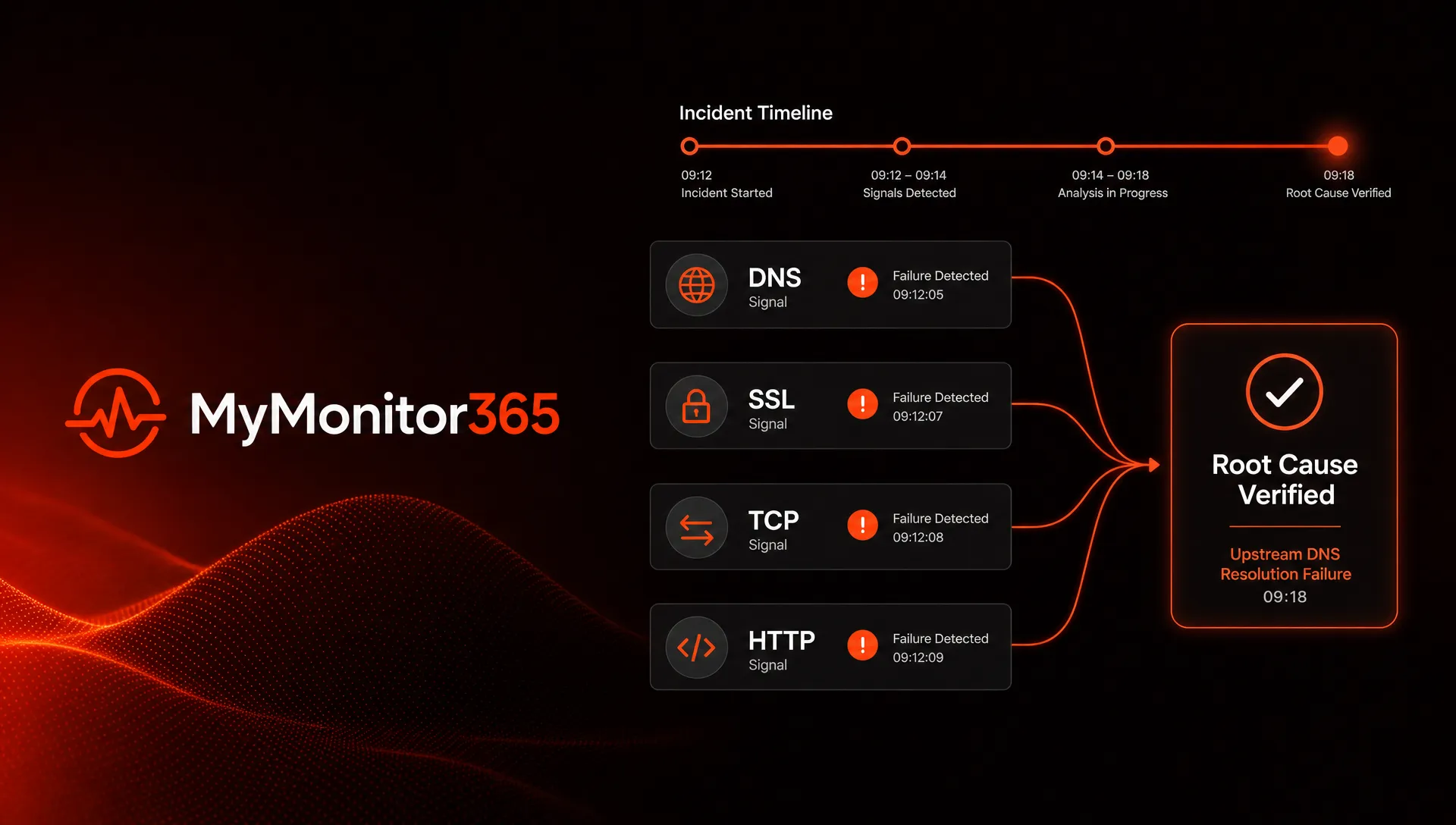
Use an RCA matrix to shorten triage
An RCA matrix helps teams map symptoms to likely fault domains without pretending that one symptom has one cause. It is not a replacement for engineering judgment. It is a way to make first response more consistent, especially for distributed teams and MSPs managing many environments.
| Observed pattern | Likely fault domain | Evidence to collect | First action |
|---|---|---|---|
| DNS fails from all locations | Authoritative DNS, registrar, record deletion, DNSSEC | Resolver errors, authoritative responses, recent DNS changes | Validate records and contact DNS owner or provider. |
| DNS differs by location | Propagation, split-horizon DNS, CDN or GeoDNS | Regional answers, TTL values, provider status | Compare intended records with live answers. |
| Ping fails, TCP fails | Host outage, routing failure, firewall, upstream network | Packet loss, traceroute, provider alerts, firewall changes | Check host, route and perimeter policy. |
| Ping succeeds, TCP fails | Closed port, listener crash, firewall rule, load balancer | Port check results, service status, firewall logs | Verify listener and network access policy. |
| TCP succeeds, SSL fails | Expired certificate, wrong certificate, protocol mismatch | Certificate chain, expiry, SNI behavior | Renew or correct certificate configuration. |
| SSL succeeds, HTTP fails | Application error, upstream dependency, bad deployment | Status codes, response body, app logs, deployment history | Escalate with endpoint and response evidence. |
| Only one region fails | ISP, CDN edge, regional routing, local dependency | Multi-location results, CDN status, route differences | Isolate regional provider or routing issue. |
This type of matrix is especially helpful for on-call rotations. It reduces the chance that each responder starts from scratch, and it gives junior team members a safe framework for evidence gathering before escalation.
Turn incident evidence into a useful post-incident RCA
After service is restored, RCA shifts from diagnosis to learning. The goal is not to prove someone made a mistake. The goal is to understand why the system allowed the incident to happen, why detection worked or failed and what practical changes will reduce recurrence.
Google’s Site Reliability Engineering guidance describes postmortems as a way to create a written record, drive improvement and avoid blame. The Google SRE postmortem culture chapter is a useful reference for teams formalizing this practice.
A strong post-incident RCA should include:
- Customer or business impact, including affected services and duration.
- Detection source, such as monitoring alert, support ticket or internal report.
- Timeline of key events, including alert, acknowledgement, escalation, mitigation and recovery.
- Root cause and contributing factors, clearly separated.
- What went well, including alerts or runbooks that helped.
- What slowed the response, including missing telemetry, unclear ownership or noisy alerts.
- Corrective actions with owners and due dates.
NIST’s incident handling guidance also emphasizes post-incident activity as part of the incident response lifecycle. The NIST Computer Security Incident Handling Guide is security-focused, but the same operating principle applies to infrastructure incidents: response improves when teams prepare, analyze, recover and feed lessons back into the process.
The most valuable RCA documents are specific. “Improve monitoring” is too broad to change behavior. “Add multi-location DNS checks for production domains, alert the ITOps channel on unexpected A or CNAME changes and review DNS ownership monthly” is actionable.
Metrics that show whether RCA is improving
You cannot improve network root cause analysis by measuring only total outage duration. MTTR matters, but it hides where time was lost. A 90-minute incident may include 5 minutes to detect, 45 minutes to find the right owner, 20 minutes to validate the cause and 20 minutes to recover. Each segment calls for a different fix.
Track metrics that reveal friction in the response path.
| Metric | What it reveals | How it helps RCA |
|---|---|---|
| Mean time to detect | How quickly monitoring identifies user-impacting issues | Shows whether coverage is early enough. |
| Mean time to acknowledge | How quickly the right person engages | Shows whether routing and escalation work. |
| Mean time to isolate | How long it takes to narrow the fault domain | Measures diagnostic effectiveness. |
| Mean time to recover | How long restoration takes after cause is understood | Separates diagnosis problems from recovery problems. |
| Repeat incident rate | Whether corrective actions are working | Exposes weak or incomplete RCA follow-up. |
| Alert precision | How many alerts require action | Shows whether responders trust monitoring. |
| Detection source mix | Whether incidents are found by tools or users | Reveals gaps in proactive monitoring. |
Mean time to isolate is especially useful for network teams. If detection is fast but isolation is slow, the problem is often missing context rather than missing alerts. Adding more alerts may make the situation worse unless those alerts clarify dependencies and reduce ambiguity.
How MyMonitor365 supports RCA-ready operations
MyMonitor365 is designed to help IT and MSP teams collect the signals needed to investigate outages faster. Instead of relying on a single availability check, teams can monitor across HTTP/API, ping and ICMP, TCP ports, SSL, DNS, keyword content and multiple locations.
That layered view supports the RCA workflow described above. DNS monitoring can reveal name resolution and change issues. SSL checks can surface certificate problems before they become customer-facing failures. HTTP/API checks can show whether an endpoint is returning the expected response. TCP and ICMP checks help distinguish reachability from application behavior.
MyMonitor365 also supports operational practices that make RCA cleaner, including maintenance windows, alert integrations, audit logs and two-factor authentication. For MSPs, multi-location checks and structured alerting are particularly useful because they help separate a local network issue from a client-wide or provider-level incident.
If your team is building a more resilient monitoring strategy for high-value systems, the same principles apply to service design, dependency coverage and escalation planning. This guide on how to protect mission critical services from downtime is a natural next step.
Practical habits that shorten the next outage
The best RCA improvements are usually small, repeated and visible. You do not need to rebuild your entire monitoring stack to make the next incident easier to solve. Start with the services that create the highest customer or business impact, then make their evidence trail stronger.
For each critical service, document the expected DNS records, ports, certificates, health endpoints, content checks, owners and escalation paths. Add multi-location checks where regional routing or third-party dependencies matter. Make sure alerts include enough context for the first responder to decide whether the issue is DNS, network reachability, TLS, application response or content mismatch.
Finally, review every significant incident for one missing signal. Ask a simple question: “What piece of evidence would have shortened diagnosis?” If the answer is a DNS change alert, add it. If the answer is a TCP port check from outside the network, add it. If the answer is clearer ownership, update the runbook and escalation policy.
Network root cause analysis improves when teams stop treating RCA as paperwork and start treating it as an evidence system. The payoff is faster isolation, cleaner handoffs and fewer recurring outages.
Frequently Asked Questions
What is network root cause analysis? Network root cause analysis is the process of identifying the underlying technical or procedural cause of a network-related outage or performance issue. It uses evidence from monitoring, logs, changes and incident timelines to separate symptoms from causes.
How does RCA reduce outage duration? RCA reduces outage duration by helping teams narrow the fault domain faster. Layered checks across DNS, ICMP, TCP, SSL and HTTP show where the service path is failing, so responders can escalate to the right owner with better evidence.
What monitoring data is most useful for network RCA? The most useful data depends on the service, but DNS results, TCP port status, SSL certificate state, HTTP/API responses, keyword content checks, latency, packet loss, regional check results and recent change history are all valuable.
Should RCA happen during the incident or after recovery? Both. During the incident, RCA is about isolating the probable cause quickly enough to restore service. After recovery, RCA becomes a structured review that validates the cause, identifies contributing factors and assigns corrective actions.
How can MSPs improve network root cause analysis across clients? MSPs can standardize monitoring templates, use multi-location checks, define service ownership, document escalation paths and maintain consistent RCA reports. This creates repeatable evidence gathering across many client environments.
Shorten outages with better monitoring evidence
If your team is still diagnosing incidents from isolated alerts, user reports or incomplete timelines, the next outage will be harder than it needs to be. MyMonitor365 helps IT operations and MSP teams monitor websites, servers, DNS, SSL and network services with instant alerts and multi-location checks.
Start building an RCA-ready monitoring foundation with MyMonitor365. The free plan requires no credit card.
Hashtags
#ITOps #RCA #RootCauseAnalysis #NetworkMonitoring #UptimeMonitoring #IncidentResponse #MSP #InfrastructureMonitoring