
SSL Domain Certificate Monitoring Made Simple
Make SSL domain certificate monitoring simple with practical checks, alert timing, ownership tips, and outage prevention for IT teams.
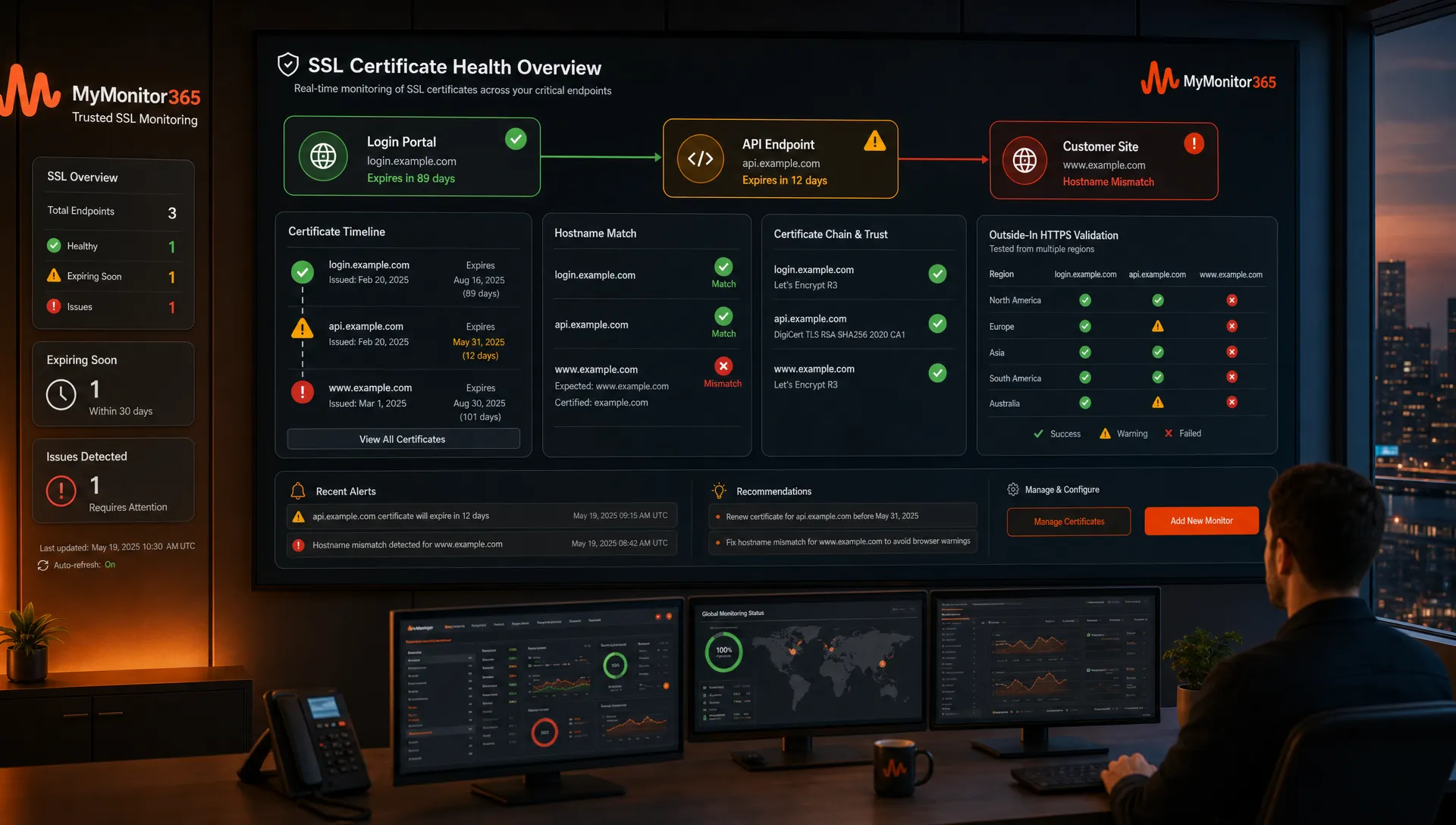
An SSL certificate failure rarely feels like a certificate problem to the people affected by it. To users, it looks like a broken login page, a privacy warning, a failed checkout, an unavailable API, or an application that suddenly cannot connect. For IT operations, that single SSL domain certificate issue can trigger support tickets, executive escalation, compliance concern, and avoidable downtime.
SSL domain certificate monitoring makes this preventable. The goal is not to stare at certificates every week or hope renewals work. The goal is to create a simple, repeatable system that detects certificate risk early, validates the full HTTPS path from the outside, and alerts the right team before users see a warning.
For IT managers, network teams, CIOs, and MSPs, simple does not mean basic. It means complete enough to catch the common failure modes, but clean enough that teams actually maintain it.
What SSL Domain Certificate Monitoring Actually Covers
SSL domain certificate monitoring is the continuous checking of certificates associated with domains, subdomains, APIs, portals, and other HTTPS endpoints. A good monitoring approach confirms that the certificate is valid, trusted, correctly matched to the hostname, and not approaching expiration.
In practice, certificate monitoring should answer five operational questions:
- Is the certificate still valid today?
- Will it expire soon enough that we need to act?
- Does the certificate match the domain users are visiting?
- Is the certificate chain trusted by common clients?
- Is the HTTPS service reachable from the outside world?
That last point matters. A certificate can be technically valid while users still cannot reach the service because DNS points to the wrong place, a CDN configuration changed, a firewall rule blocks traffic, or a load balancer is serving an old certificate. Certificate monitoring becomes far more valuable when it is paired with HTTPS, DNS, and network checks.
If your team needs a refresher on terminology such as TLS, certificate chains, SANs, and certificate authorities, start with this guide to Certificate SSL TLS basics for IT teams. Once the fundamentals are clear, the monitoring workflow becomes much easier to design.
Why Certificate Monitoring Is Getting Harder
Certificate management used to be simpler for many organizations. A small number of domains had annual certificates, renewals were handled by one infrastructure team, and the public web footprint was easier to map. That model no longer matches how modern IT environments work.
Today, organizations may have production websites, customer portals, admin panels, APIs, partner integrations, staging environments, regional hostnames, SaaS-managed domains, CDN edges, VPN portals, mail security services, and client-specific MSP endpoints. Some certificates renew automatically, some are managed by vendors, and some still depend on manual action.
Certificate lifetimes are also moving shorter. The CA/Browser Forum has approved a phased reduction in public TLS certificate validity and domain validation reuse periods, which increases the importance of reliable renewal automation and independent monitoring. Shorter lifetimes can improve security, but they also reduce the margin for teams that rely on calendars, spreadsheets, or tribal knowledge.
The risk is not limited to technology companies. A homeowner trying to contact TapTech, a Kingston plumbing and drain cleaning provider, may not know whether a browser warning is caused by an expired certificate, a DNS issue, or a server outage. They only know the site feels unsafe or unavailable. The same is true for patients using a clinic portal, employees accessing HR systems, or customers checking an invoice.
This is why SSL domain certificate monitoring should be treated as uptime monitoring, security monitoring, and customer experience monitoring at the same time.
The Simple Model: Inventory, Validate, Alert, Improve
The simplest sustainable monitoring model has four parts: inventory, validation, alerting, and continuous improvement. If any one of these is missing, certificate monitoring becomes reactive again.
Inventory starts with knowing what exists. Teams should maintain a list of public-facing domains, important internal endpoints, APIs, load balancers, and third-party managed hostnames that affect users or business operations. The inventory does not need to be perfect on day one, but it should be actively improved whenever new services are launched or incidents reveal gaps.
Validation means checking what users actually experience. Internal certificate scans are useful, but they do not replace external monitoring. A certificate may look valid from inside the network while external users receive a different certificate from a CDN, reverse proxy, or regional edge. Multi-location monitoring helps reveal regional routing issues, DNS propagation problems, and provider-specific failures.
Alerting turns monitoring data into action. Expiration warnings should go to the team that can renew or replace the certificate, not to a general inbox that nobody owns. Alerts should also include enough context to accelerate triage, such as the hostname, the failing check, the time detected, and the severity.
Improvement is the final step. Every certificate incident should answer one question: what monitor, owner, or process would have caught this earlier? Over time, that habit turns certificate management from a recurring fire drill into a controlled operational process.
| Monitoring layer | What to validate | Why it matters |
|---|---|---|
| Domain and DNS | A, AAAA, CNAME, and DNS changes for critical hostnames | DNS mistakes can send users to the wrong service or an old certificate |
| SSL and TLS certificate | Expiration, validity dates, hostname match, SAN coverage, and certificate chain | These issues trigger browser warnings and failed API connections |
| HTTPS transaction | Status code, redirects, response time, and expected content | A valid certificate does not guarantee the application is working |
| Network reachability | Ping, TCP port, and service availability where relevant | Firewalls, ports, and routing issues can look like certificate failures |
| Operational ownership | Service owner, renewal method, and escalation route | Monitoring only helps if the right person can act quickly |
Alert Timing That Prevents Last-Minute Incidents
The most common mistake in certificate monitoring is alerting too late. If the first alert fires one day before expiration, the team may still be able to fix the issue, but the process has already failed. Renewal may require domain validation, vendor approval, access to DNS, change control, or coordination with an application owner.
A practical alert schedule often includes notifications at 30 days, 14 days, 7 days, 3 days, and 1 day before expiration. The exact thresholds should match your renewal process. If certificates normally renew automatically at 30 days, an alert at 14 days can confirm that automation failed or that the monitor is seeing a stale certificate.
For business-critical services, treat certificates expiring within 7 days as an operational incident, not a routine reminder. At that point, the risk window is small, and the team should confirm ownership, renewal method, deployment plan, and post-renewal validation.
Alert fatigue is also real. To keep alerts useful, avoid sending every warning to every person. Route alerts by service owner, business unit, client, or severity. Use maintenance windows when planned changes will temporarily affect HTTPS checks. For MSPs, separate client alerts clearly so one customer's certificate issue does not get buried in a noisy shared queue.
If expiration has already been a recurring problem, this guide on how to prevent security certificate expiration issues can help you build the ownership and renewal process around monitoring.
What to Monitor Beyond Expiration
Expiration is the easiest certificate problem to understand, but it is not the only one that causes outages. A mature SSL domain certificate monitoring strategy should also watch for configuration drift and trust failures.
Hostname mismatch is one of the most visible issues. It happens when the certificate served by the endpoint does not include the domain the user requested. This can occur after load balancer changes, CDN onboarding, migration errors, or the accidental deployment of a certificate intended for another environment.
Certificate chain problems can be harder to diagnose. A server may present the leaf certificate but fail to include the correct intermediate certificate. Some clients may still work because they can build the chain themselves, while others fail. This inconsistency can create confusing support cases because the problem appears only for certain users, devices, or integrations.
Unexpected certificate changes should also be investigated. A planned renewal is normal. A sudden issuer change, SAN change, or certificate replacement outside a maintenance window may indicate a vendor change, a deployment mistake, or a possible security concern. Monitoring is valuable because it creates an independent signal that something changed.
Redirects are another common blind spot. Many sites redirect from HTTP to HTTPS, from apex domains to www subdomains, or from old application paths to new portals. If only the final destination is monitored, a certificate issue on the redirecting hostname may go unnoticed until users hit it directly. Monitoring important entry points helps catch these edge cases.
For a deeper operational view of what HTTPS checks should catch, review these HTTPS certificate checks that prevent costly outages.
A Practical Workflow for IT Operations and MSPs
A simple workflow should be clear enough for daily operations and strong enough for audit review. Start by assigning ownership to every monitored certificate or service. Ownership should include the technical owner, the escalation contact, and the person or team responsible for renewal.
Next, define severity. Not every certificate has the same business impact. A public login portal, payment flow, customer API, or VPN gateway should have a higher escalation path than a low-traffic test endpoint. This does not mean ignoring lower-priority certificates. It means matching urgency to business risk.
Then, document the renewal method. Some certificates use ACME automation. Others are renewed through a cloud provider, CDN, certificate authority portal, hosting vendor, or internal PKI. During an incident, the team should not waste time discovering where the certificate came from or who has access.
Finally, validate after renewal. A renewed certificate is not successful until the live endpoint is serving it correctly from the locations that matter. Post-renewal checks should confirm the new expiration date, hostname match, chain validity, and HTTPS response.
| Situation | Recommended response |
|---|---|
| Certificate expires in 30 days | Confirm renewal owner and renewal path |
| Certificate expires in 14 days | Open or update a tracked ticket |
| Certificate expires in 7 days | Escalate as an operational risk |
| Certificate expires in 3 days or less | Treat as an incident for critical services |
| Wrong hostname or certificate chain failure | Investigate immediately, even if expiration is not near |
| Unexpected certificate or DNS change | Confirm whether the change was planned and authorized |
How MyMonitor365 Helps Keep Certificate Monitoring Simple
MyMonitor365 is built for infrastructure monitoring across websites, servers, DNS, SSL, and network services. For SSL domain certificate monitoring, the value comes from combining certificate visibility with the surrounding checks that prove the service is actually reachable and trustworthy.
Teams can monitor SSL security alongside HTTP/API checks, DNS change monitoring, ping and ICMP checks, TCP port monitoring, and multi-location monitoring. That combination helps separate certificate problems from DNS, routing, application, or network issues. Instead of receiving a vague user complaint, IT teams get earlier signals from the layer that is failing.
Alert integrations help route incidents into the tools teams already use, while maintenance windows reduce unnecessary noise during planned work. For teams with compliance and accountability needs, features such as audit logs and two-factor authentication support better operational control.
For MSPs, the same principles apply across client environments. Monitoring each client's critical domains, renewal windows, and customer-facing services helps prevent avoidable escalations and demonstrates proactive service management.
SSL Domain Certificate Monitoring Checklist
Use this checklist to simplify your program without missing the essentials:
- Monitor every production domain, subdomain, API endpoint, and customer portal.
- Include redirect hostnames, not only final landing pages.
- Check expiration far enough in advance to allow renewal, approval, and deployment.
- Validate hostname match, SAN coverage, and certificate chain trust.
- Pair SSL checks with HTTPS, DNS, and network monitoring.
- Assign an owner and escalation path for every critical certificate.
- Confirm automated renewals from the outside after they complete.
- Review incidents and add monitors for any blind spots discovered.
The best certificate monitoring program is not the one with the most complex spreadsheet. It is the one that continuously checks the right endpoints, alerts the right people, and proves that users can reach the service securely.
Frequently Asked Questions
What is SSL domain certificate monitoring? SSL domain certificate monitoring is the continuous checking of SSL and TLS certificates for domains, subdomains, APIs, and portals. It helps detect expiration, hostname mismatch, chain issues, and other certificate problems before users encounter browser warnings or failed connections.
How often should SSL certificates be monitored? Critical public-facing certificates should be monitored continuously, with expiration alerts starting weeks before the certificate expires. Many teams use alert thresholds such as 30 days, 14 days, 7 days, 3 days, and 1 day before expiration.
Is automated renewal enough to prevent certificate outages? Automated renewal helps, but it is not enough by itself. Renewal jobs can fail due to DNS issues, validation errors, permission changes, rate limits, deployment mistakes, or stale load balancer configurations. Independent external monitoring confirms what users actually receive.
Should internal certificates be monitored too? Yes, if they support important applications, APIs, VPNs, management portals, or service-to-service communication. Internal certificate failures can disrupt operations even when public websites remain online.
What is the difference between SSL monitoring and HTTPS monitoring? SSL monitoring focuses on the certificate and TLS trust path. HTTPS monitoring checks the web transaction itself, such as response code, redirects, content, and performance. Using both gives a more complete view of user experience.
Make SSL Domain Certificate Monitoring Easier
Certificate incidents are preventable when monitoring, ownership, and alerting work together. With MyMonitor365, IT teams and MSPs can monitor SSL, HTTP/API, DNS, and network services from one platform, receive instant alerts, and reduce the risk of avoidable outages.
Start with your most critical domains, add the checks that prove real user reachability, and build from there. MyMonitor365 offers a free plan with no credit card required.
Hashtags
#SSLMonitoring #CertificateMonitoring #ITOperations #UptimeMonitoring #NetworkMonitoring #MSP #MyMonitor365